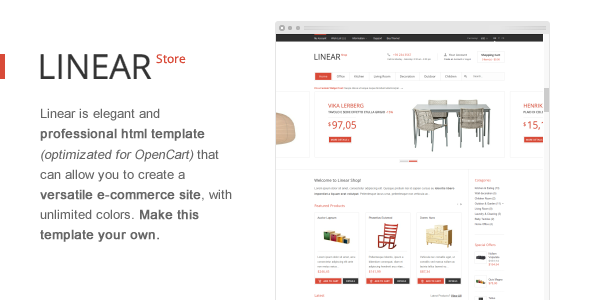
Built as a static HTML and CSS storefront kit for OpenCart-style shops, Linear Store ships 19 page layouts that cover the whole path from homepage through to order confirmation, plus a blog and a working contact form. It is a front-end design rather than an OpenCart extension: the markup, stylesheets and JavaScript are supplied, and the work of connecting them to a live cart is left to the buyer. Freelancers and small agencies assessing a low-cost Linear Store retail front end should read on; anyone expecting a responsive, install-and-go theme is looking in the wrong part of the marketplace.
What the Linear Store retail package actually gives a project
The page count is the headline. Nineteen layouts is generous at this price, and the vendor documents each one by name, so the scope can be checked before purchase rather than discovered after download.
The two homepage files are not duplicates. One runs the lightweight jCarousel Lite slider, the other the more theatrical Nivo Slider, which means a project can pick between a quiet banner rotation and a full-width image showcase without touching the code. The same logic applies deeper in: two product pages, one using Cloud Zoom for an in-place magnifier and one using Fancybox for a lightbox overlay, and two category pages, one in list view and one in grid view. For catalogue work, that covers the common case where a dense list suits long product names and a grid suits image-led goods.
The transactional pages are complete in the way a Linear Store retail build usually needs them to be: cart, a checkout split across six steps, login, registration, account, wishlist and 404. None of these carry live logic — the six-step checkout is a visual sequence — but together they form a presentable end-to-end flow for a client walkthrough or a design sign-off.
Styling is handled entirely in CSS. Titles, body text, links, borders, input fields and both header and footer backgrounds are set by editable rules, and six pattern images are included for the header and footer. The vendor markets this as unlimited colours; in practice it means no image files need rebuilding to change a palette, which is faster and cleaner than slicing new graphics. There is no admin panel or colour picker, so the change happens in a text editor.
Smaller pieces round out the package: AddThis share buttons on the product page, a Facebook fanbox and a Twitter box, a typography sheet listing headings, lists, blockquotes and columns, and a full elements page covering buttons, tabs, accordions, tables and info boxes. Those last two pages are effectively a style guide, and they are the most underrated part of the download — a second developer can see exactly which patterns exist without reading every file. The CSS is commented and organised, the interactions lean on jQuery plugins, and the type is set in Open Sans served through Google WebFonts.
Where Linear Store retail layouts fit, and where they do not
The natural use is a small or mid-sized shop that wants a finished visual layer quickly. That covers a freelancer producing a client-facing prototype before development starts, an agency that needs a credible e-commerce mockup for a pitch, and a shop already running an older OpenCart installation whose front end needs a facelift without a rebuild. Because the markup is plain HTML and CSS, it also works as a starting point for a static catalogue site that takes orders by phone or email rather than through a cart.
It is the wrong choice for a new store launching in the current climate. The vendor’s compatibility list names Internet Explorer 8 and 9, Firefox 3+, Safari and Chrome, and says nothing about responsive behaviour, mobile navigation or breakpoints. A shop with meaningful phone traffic needs a layout that adapts, and nothing in the listing promises that. The same applies to anyone who wants to upload a theme package through the OpenCart admin and see a store appear: this is not that file. Teams that need the checkout handled server-side, accessibility conformance documented, or a modern build pipeline should start elsewhere.
What setting the template up involves in practice
Setup begins with unzipping the download and opening the index file in a browser, so the first review takes minutes rather than hours. The prerequisites are modest but real: a text editor, some familiarity with CSS selectors and jQuery plugin configuration, and the ability to swap demo images and rewrite the slider and lightbox initialisation calls.
Restyling a static page and replacing the placeholder photography is a half-day to two-day job for someone comfortable with CSS. The demo product images are credited to IKEA, so they are placeholders only and cannot travel with the finished site; a buyer needs their own photography before the design looks finished.
Integration into a working OpenCart store is the slower stage, and the vendor does not supply instructions for it. Each static page has to be mapped onto the platform’s template files and controllers, with the cart, checkout and account loops rebuilt server-side. Budget several days for a first integration, less on subsequent projects once the mapping is known. Documentation covers the template itself, and support runs through the author’s profile feedback form with replies promised within 24 to