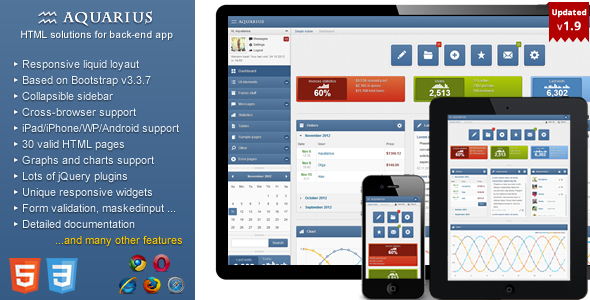
Aquarius is a responsive admin panel template built on Bootstrap 3 and jQuery, sold on ThemeForest by the developer Aqvatarius for $16. It provides a ready-made interface shell — navigation, dashboards, forms, tables, charts and a long list of pre-styled plugins — that a developer can drop into a backend project instead of building the layout from scratch. It suits freelancers and small agencies producing internal tools, dashboards or content management backends on a tight budget, and it has accumulated 746 sales since its release.
Buyers researching Aquarius Admin Templates are usually weighing one question: does a template this old still save time, or does it create work? The answer depends heavily on the stack being used, and this review sets out where the template remains genuinely useful and where it does not.
What Aquarius Admin Templates Actually Include
The template ships with a broad set of interface components rather than a single dashboard screen. Understanding the scope matters, because the value of a package like this comes from how much of the interface work it removes.
Layout and navigation
The core structure is a responsive left-hand navigation with a collapsible two-level menu, plus a separate middle navigation bar with six background colours and two icon colours. A cookie-based control lets the panel remember whether the sidebar is visible between page loads. Layouts can be either liquid two-column or fixed, and the whole thing adapts down to tablet and phone widths.
Pre-built pages and widgets
Beyond the dashboard, the package includes a user profile page, a mailbox template, a users information page, an FAQ example, custom error pages, and an integrated web file manager. There are also custom widgets and alert blocks for warning, error, success and information states, each with a hide effect. These are the pieces that normally consume a day or two of styling work on a new project.
Charts, tables and form controls
Data presentation is covered by Flot for charts and Sparkline for inline mini-charts, with DataTables handling sortable, searchable tabular data. On the form side, the template bundles Select2 for searchable dropdowns, Uniform for consistent checkbox and radio styling, Masked Input for formatted fields, TagsInput, MultiSelect, Stepy for multi-step forms, and an inline validation engine with multi-language support. A WYSIWYG editor (CLEditor) and a Plupload-based file uploader round out the input tooling.
Theming and visual options
Eight template colours and eight custom backgrounds ship with the package, and the vendor describes changing them as straightforward. jQuery UI elements are styled to match: accordions, tabs, sortable and selectable lists, datepickers, sliders, and progress bars in default, animated-with-percentage and delayed-start variants. Dialog windows are available through both jQuery UI and Bootstrap modal implementations.
Browser support
The template claims compatibility with all modern browsers and additionally supports Internet Explorer 7 and 8. That last point is unusual for a Bootstrap 3 build and is worth noting, because it implies conditional stylesheets or polyfills somewhere in the codebase. For most projects in 2024 and beyond, IE7 support is dead weight; for organisations still running legacy internal systems on old Windows machines, it is one of the few remaining options.
Where This Template Fits — and Where It Does Not
Aquarius makes most sense for internal-facing software. A freelancer building an order management screen, an agency producing a client reporting dashboard, or a small team standing up an inventory tool can take the template, wire the markup to a backend, and have something presentable quickly. The breadth of bundled plugins means fewer separate library decisions and fewer version conflicts to resolve.
The legacy browser support points to one specific niche: organisations maintaining intranet applications for older hardware. That is a narrow but real market, and few modern admin templates serve it.
It is the wrong choice for customer-facing products where visual distinctiveness matters. The design language is unmistakably mid-2010s Bootstrap, and a product competing on interface quality will look dated next to anything built on a current component library. It is also a poor fit for teams working in React, Vue or Angular. The template is server-rendered HTML with jQuery, and adapting it to a component framework means discarding most of the JavaScript layer — which is a large part of what the $16 buys.
What Setup Involves
Installation is a file copy, not an installation process. The buyer downloads a package, extracts the HTML, CSS, JavaScript and asset folders, and opens the sample pages in a browser to see what is available. There is no build step, no package manager and no compilation, which keeps the barrier to entry low.
From there, the work is integration. A developer picks the page closest to the target screen, strips the demo content, and connects the markup to real data. The bundled plugins each carry their own initialisation code, so teams should expect to spend time removing the plugins they do not need — the full set adds weight to every page load. The vendor states the template is well documented, though the listing does not specify the format or depth of that documentation.
A realistic estimate for a developer familiar with Bootstrap: half a day to explore the package and pick a starting layout, then one to three days to produce a working first screen wired to real data. Teams new to Bootstrap 3 or to any of the bundled jQuery plugins should allow longer, particularly for the file manager and calendar components.
Strengths and Limitations
Strengths
- Wide component coverage in a single purchase: charts, tables, forms, file upload, WYSIWYG editing and a file manager are all included, which removes a string of separate library evaluations.
- Genuine legacy browser support, including IE7 and IE8, which is rare in this category.
- Liquid and fixed layout options plus eight colour schemes give more visual flexibility than the price suggests.
- No build tooling required, so it works in any server-side environment that can serve HTML.
- Established sales history and an active developer presence on the marketplace.
Limitations
- The last vendor update was September 2017. The bundled libraries — jQuery 1.10.2, Bootstrap 3, Flot 0.7, DataTables 1.9.4 — are all several major versions behind current releases, and some carry known security advisories that buyers would need to patch themselves.
- Because the template is jQuery-based, it does not integrate with modern JavaScript frameworks without substantial rework.
- The plugin list is long enough that page weight becomes a real concern unless unused components are stripped out manually.
- Accessibility is not addressed in the vendor’s feature list. Keyboard navigation, ARIA attributes and colour contrast are not mentioned, and a template of this era typically handles them inconsistently.
- No stated support for right-to-left languages, which rules it out for Arabic, Hebrew or Farsi interfaces without custom work.
How Aquarius Compares to Other Admin Templates
The admin template category splits roughly into three groups: free open-source admin panels, modern commercial templates built on current frameworks, and legacy Bootstrap templates like this one.
Free open-source options cost nothing and receive ongoing maintenance, but they typically require more assembly — the buyer picks and configures each component. Modern commercial templates cost more, often in the $30 to $60 range, and ship with current dependencies, framework versions and better accessibility. Aquarius competes on price and on the sheer number of pre-styled components included at $16.
The deciding factor is the target environment. For a new project on a modern stack, a current template is the better investment despite the higher price, because the time saved patching outdated dependencies exceeds the difference. For a legacy system, an internal tool with a short lifespan, or a prototype where speed matters more than longevity, the lower cost and legacy browser support tip the balance toward Aquarius.
Frequently Asked Questions
Is Aquarius compatible with Bootstrap 4 or Bootstrap 5?
No. Aquarius is built on Bootstrap 3, and the class names, grid behaviour and JavaScript plugins differ substantially from later versions. Upgrading it to Bootstrap 4 or 5 would mean rewriting the markup and replacing the jQuery plugin layer, which is effectively a rebuild rather than an upgrade.
Can Aquarius be used with React, Vue or Angular?
Not directly. The template is server-rendered HTML with jQuery handling interactivity, so its components do not map onto a component-based framework. A developer could reuse the CSS and visual styling inside a framework project, but the JavaScript layer and the bundled plugins would need to be replaced entirely.
Does the template still receive updates?
The vendor’s most recent update was in September 2017, and the listing identifies version 1.9.0 as current. Buyers should treat the package as feature-complete and unmaintained rather than actively developed, and should plan to patch any bundled library vulnerabilities independently.
Is Aquarius suitable for a customer-facing web application?
It can be used that way, but it is not ideal. The visual style reflects its era and will read as dated beside current design standards, and the template does not advertise accessibility features. It is better suited to internal dashboards and administrative tools where function matters more than presentation.
Verdict
Aquarius remains a reasonable purchase for a specific buyer: a developer or small team building an internal dashboard, admin tool or legacy-compatible interface on a server-rendered stack, who wants a large set of pre-styled components for $16 and accepts that the underlying libraries are years out of date. The 746 sales and the developer’s ongoing marketplace presence suggest the package has served that audience adequately.
It is not the right choice for anyone building a customer-facing product, working in a modern JavaScript framework, or needing current security patches and accessibility support out of the box. Those buyers will spend more time working around the template than building with it, and a newer commercial alternative at a higher price will almost certainly cost less in total effort.