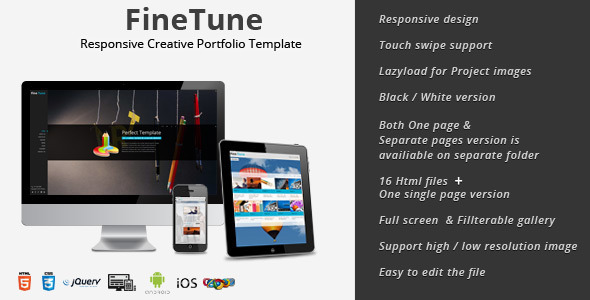
FineTune is a responsive creative portfolio template sold on ThemeForest by the developer FMedia. It packages a one-page layout and a separate multi-page version in a single download, aimed at photographers, designers and small studios that want a visual-first site without building one from scratch. The listing price is $17, and it has been purchased 394 times.
The template sits in a well-populated category: cheap, image-led portfolio themes that promise to look good on every screen. What separates FineTune from most of that field is not the visual style but the decisions the developer made about asset loading, navigation and file structure. Those decisions are worth examining before anyone spends money on it.
What FineTune Actually Does Well
The most substantive feature is the two-tier image system. Each page and each gallery item can hold a high-resolution image for desktop screens and a low-resolution version for phones and tablets. The template detects the device and serves the smaller file where appropriate. For a photography portfolio, where a single hero image can easily run to several megabytes, that is a meaningful performance decision rather than a cosmetic one. It reduces download time on mobile connections and lowers the risk of a visitor abandoning the page before the first image appears.
Related to that, project and news images use lazy loading. Images are only fetched when the item scrolls into view or is opened, so a portfolio index page with thirty thumbnails does not force the browser to pull thirty full-size files at once. The vendor also provides an option to attach both resolutions to each project, which means the same discipline applies inside detail pages, not just on the index.
Navigation is handled through the jQuery History plugin. Every page gets its own bookmarkable URL, and the browser back and forward buttons behave normally. This matters more than it sounds. Many one-page templates built in the same era hijacked the URL bar or broke the back button entirely, which makes a site hard to share and awkward to use. FineTune avoids that trap.
Portfolio and news layouts are configurable rather than fixed. There are six portfolio variations, and the number of thumbnails shown per row can be set. An isotope-based filter lets visitors narrow a gallery by category without a page reload. The full-screen gallery includes animated captions and supports both Vimeo and YouTube embeds, with a cover image option so a video does not leave an empty gap before it loads.
On the presentation side, the download contains light and dark versions as separate folders, four folders in total, and the colour scheme is controlled from a single CSS file. Changing a brand colour is therefore a one-line edit rather than a hunt through stylesheets. PSD files are included for anyone who wants to modify the design itself, and the template uses the Open Sans Google font for menus, titles and some body copy, which can be swapped by editing a link in the custom JavaScript file.
Where FineTune Fits, and Where It Does Not
This template suits a photographer, illustrator or small design studio that needs a finished portfolio site quickly and does not want to commission custom development. It also works for a fashion or lifestyle brand that needs a lookbook-style gallery with filterable categories, and for a corporate site that wants a single scrolling landing page with a separate blog underneath.
The dual-resolution image handling makes it a reasonable choice for anyone whose visitors are likely to be on mobile data, which covers most consumer-facing photography work.
It is the wrong choice for a project that needs a content management system. FineTune is a static HTML template. Adding a new project means editing markup, not logging into a dashboard. A business planning to publish weekly, or a client who expects to update the site themselves, should look at a WordPress theme instead. It is also a poor fit for anyone who needs e-commerce, membership areas, multi-language support or any other application-level functionality.
Setting Up FineTune in Practice
No build tools, package managers or server-side software are required. The template is plain HTML, CSS and JavaScript, so it can be opened locally in a browser or uploaded to any static host. The only prerequisite is a text editor and a basic comfort with reading HTML markup.
Initial setup is quick. Uploading the folder and changing the logo, colours and contact form recipient address is roughly an hour of work. Replacing the demo images with real content is the longer task and depends entirely on how much material exists. The vendor notes that the preview images are licensed from Depositphotos and are not included in the purchase, so every image on the site has to be supplied by the buyer.
The contact form uses Ajax, meaning it submits without reloading the page. That requires a server-side mail script or a form service to actually deliver messages; the template provides the front end only. The vendor does not state which backend the demo form posts to, so that connection has to be configured separately.
One practical caveat: the last vendor update was in February 2014. The listing includes a code patch from January 2014 that replaces touch detection logic after a Chrome update broke it. That patch is already reflected in the current files, but it also signals the template’s age. Anyone buying now should expect to test touch behaviour, form submission and video embedding on current browsers rather than assuming everything works out of the box.
Strengths and Limitations
Strengths
- Separate high and low resolution images per page and per project, which keeps mobile load times under control.
- Lazy loading on portfolio and news images, so index pages stay light regardless of how many projects exist.
- Bookmarkable URLs and working browser history through the jQuery History plugin.
- Six portfolio layouts, configurable thumbnail counts and an isotope filter for categorised galleries.
- Light and dark versions plus a single CSS file for colour changes, which keeps rebranding cheap.
- PSD files included, so the design can be altered rather than only recoloured.
Limitations
- Static HTML only. There is no CMS, so content updates require editing files directly.
- Last updated in 2014. Modern browser behaviour around touch events, video embeds and form handling is not guaranteed and should be verified before launch.
- Demo images are not included. The buyer must license or supply every photograph.
- The Ajax contact form needs a separate backend that the vendor does not document.
- No stated support policy or update roadmap in the listing, which is a risk for a template this old.
- The design language reflects its era; anyone wanting a current editorial or minimal aesthetic will need to do significant PSD work.
How It Compares to Other Creative Portfolio Templates
FineTune competes in the budget tier of creative portfolio templates, where the differentiator is usually either visual polish or technical care. On polish, it is unremarkable: the layout is clean and functional but does not have the editorial confidence of newer premium themes. On technical care, it is stronger than most of its price peers. The dual-resolution image system and lazy loading are features that many templates at twice the price do not implement at all.
The real dividing line is the CMS question. A WordPress portfolio theme costs more but lets a non-technical owner publish work without touching code. FineTune trades that convenience for speed, a small footprint and no database to maintain. For a freelancer with a fixed body of work and no plans to publish frequently, that trade is sensible. For anyone with an ongoing publishing schedule, it is not.
There is also the maintenance question. A static template has no plugin updates or security patches to worry about, which is genuinely an advantage. But it also has no developer actively fixing it when a browser changes behaviour. Buyers are effectively taking on that responsibility themselves.
Frequently Asked Questions
Does FineTune work with WordPress?
No. FineTune is a static HTML, CSS and JavaScript template, not a WordPress theme. It cannot be installed through the WordPress dashboard and has no admin panel. Using it means editing files directly and uploading them to a host. Anyone who needs a WordPress portfolio should look at themes built for that platform instead.
Is FineTune still usable in current browsers?
It can be, but it needs testing. The template was last updated in 2014, and the vendor already had to patch touch detection once after a Chrome change. Core layout and styling should hold up, but touch swiping, video embeds and the Ajax form should each be verified on current desktop and mobile browsers before a site goes live.
Are the demo images included in the purchase?
No. The listing states that all preview images are licensed from Depositphotos and are excluded from the download. Buyers must supply their own photography or license images separately. This is a real cost to factor in, particularly for a photography portfolio where image quality drives the entire design.
Can the colour scheme and fonts be changed?
Yes. Colours are controlled from a single CSS file, so a full rebrand is a short edit rather than a stylesheet overhaul. Fonts are handled separately: Open Sans is loaded from Google Fonts for menus, titles and some body text, and swapping it means changing the font link in the custom JavaScript file.
Verdict
FineTune creative portfolio template is a sensible purchase for a freelancer, photographer or small studio that has a finished body of work, wants a fast static site, and is comfortable editing HTML. The dual-resolution image handling and lazy loading are genuinely useful, and the bookmarkable URLs show more care than most templates at this price. It is not the right choice for anyone who needs a CMS, plans to publish regularly, or expects a developer to keep the template current. At $17 with 394 sales, the risk is low, but buyers should budget time for browser testing and for sourcing every image themselves.