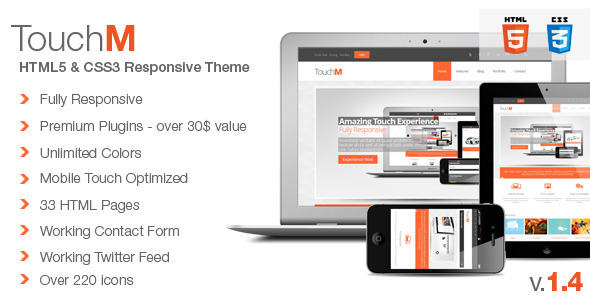
TouchM Premium HTML5 Multipurpose Responsive is a static website template built on the Foundation 3 framework, sold on ThemeForest by the developer FourGraFx for $18. It ships as a set of hand-coded HTML5 and CSS3 pages rather than a WordPress theme, and it is aimed at freelancers and small studios that need a clean corporate or business site with touch-friendly sliders, a filterable portfolio and a working contact form. The listing has accumulated 804 sales, which is a reasonable signal of adoption for a template of this age.
The first thing to understand about this product is that it is not a content management system. There is no admin panel, no database and no plugin architecture. Every page is a separate HTML file that has to be edited by hand and uploaded to a host. That single fact determines whether TouchM Premium HTML5 Multipurpose Responsive corporate projects make sense for a given buyer, and it is the distinction most reviews of this category gloss over.
What the template actually delivers for corporate and business sites
The core of the package is a responsive grid built on Zurb’s Foundation 3 framework, which was a widely used front-end toolkit at the time of release. Foundation 3 uses a 960-pixel grid that collapses gracefully as the viewport narrows, so a layout designed on a desktop screen reflows into a single column on a phone without a separate mobile stylesheet. The markup is valid HTML5, which matters if accessibility audits or search engine parsing are part of the brief.
Touch handling is the feature the vendor leans on hardest, and it is more than a marketing line. The interactive elements — sliders, the lightbox, the portfolio grid — respond to swipe, tap and double tap rather than relying on hover states. On a desktop browser this is invisible, but on a tablet it is the difference between a gallery that feels native and one that feels broken. Anyone who has tried to open a hover-triggered overlay on an iPad knows how badly that fails.
Three separate slider libraries are bundled: Slider Revolution, Camera Slider and Flexislider. Having three is unusual and genuinely useful, because each suits a different job. Slider Revolution handles layered, animated hero sections; Flexislider is lighter and better for simple image rotation; Camera Slider sits somewhere between the two. The vendor states that Slider Revolution alone carries a $12 value and the Titan Lightbox another $14, which at an $18 asking price is a fair point, though those figures reflect the standalone licence prices rather than what a buyer would realistically pay.
The portfolio section uses Isotope, a JavaScript library that filters and reorders grid items with animated transitions. In practice this means a visitor can click “Branding” or “Web” and watch the grid reshuffle itself without a page reload. Several layout variants are included, plus a version with sidebar navigation.
Beyond that, the package contains roughly 30 HTML pages — the vendor’s own count splits these into 25 content pages and 8 shortcode demonstration pages — covering the usual corporate ground: about, services, team, pricing, blog listings and a working contact form. There is a functioning Twitter feed, an under-construction page and a 404 page. Colour changes are handled by editing a colour code in four places, and the vendor claims over 20 background patterns and more than 220 icons. Typography draws on Google Fonts, with the listing citing over 500 available typefaces.
Where this template fits, and where it does not
TouchM Premium HTML5 Multipurpose Responsive corporate work is the clearest fit. A five-to-ten page brochure site for a consultancy, an agency, a law firm or a small manufacturer is exactly the shape this template was built for. The filterable portfolio also makes it a sensible choice for a design studio or photographer who wants a visual grid that behaves well on tablets, since that is where portfolio browsing increasingly happens.
Freelancers building fixed-scope sites for clients benefit most, because the hand-coded approach means there is no CMS overhead to configure, no security patching to schedule and no hosting requirements beyond a basic static host. A single-page marketing site or a campaign microsite is another good match.
It is the wrong choice in several common situations. If a client needs to edit their own content — adding blog posts, swapping team members, updating prices — a static template is a poor fit, and a WordPress theme or a lightweight CMS would serve them far better. It is also a poor fit for e-commerce, membership sites, multi-language installations or anything requiring user accounts, because none of that infrastructure exists here. Finally, anyone expecting ongoing framework updates should look elsewhere: the vendor’s last recorded update is dated October 2014, so the template is effectively frozen.
What setup involves in practice
There is no installation process in the usual sense. A buyer downloads a ZIP archive, extracts it and opens the HTML files in a code editor. Getting a working site live involves three steps: editing the shared header and footer across every page, replacing the placeholder copy and stock imagery, and uploading the folder to a web host via FTP or a control panel file manager.
The shared header and footer are the main friction point. Because there is no templating engine, a change to the navigation menu has to be repeated on every page that uses it. On a ten-page site that is tedious but manageable; on a thirty-page site it becomes a genuine maintenance burden, and it is the single strongest argument for choosing a CMS-backed alternative.
Prerequisites are minimal: a text editor, a web host and a basic grasp of HTML and CSS. No build tools, package managers or command line are required. A competent front-end developer can have a five-page site restyled and populated in an afternoon. Someone with no HTML experience should expect a much longer timeline, or should budget for hiring a developer — the documentation covers the template’s structure and the bundled slider and lightbox plugins, but it is not a tutorial in web development.
The vendor directs support requests to a dedicated forum rather than a ticket system. The testimonials on the listing repeatedly praise response speed, with one buyer reporting a fifteen-minute reply, though those comments date from the original release period and should be read with that in mind.
Strengths and limitations
Strengths
- Genuine touch support across sliders, lightbox and portfolio, not just a responsive breakpoint.
- Three bundled slider libraries give real flexibility in how hero sections are built.
- Valid HTML5 markup and a Foundation 3 grid, which keeps the codebase predictable for developers.
- Isotope-powered filterable portfolio with multiple layout options, including a sidebar variant.
- Roughly 30 ready-made pages covering standard corporate content, plus 404 and under-construction pages.
- Low price point relative to the number of components included.
- A working contact form and Twitter feed are included rather than left as an exercise.
Limitations
- No content management system. Every text change requires editing HTML directly, and shared elements like the navigation must be updated page by page.
- The last vendor update is dated October 2014. Foundation has since moved through several major versions, so the framework underpinning the template is well behind current practice.
- Bundled third-party plugins such as Slider Revolution will not receive security or compatibility updates through this template, which is a real concern for anything long-lived.
- Colour customisation is limited to editing four colour codes. There is no visual theme options panel, so anything beyond a global accent colour means writing CSS.
- Placeholder imagery is sourced from Flickr under various licences. Buyers must verify and replace it rather than assume it is cleared for commercial use.
- The vendor does not state whether the template is tested against current browser versions, only that it supports “all major browsers”.
How it compares with the wider category
The realistic alternatives fall into three groups. The first is a modern static HTML template built on a current framework such as Bootstrap 5 or Tailwind. Those offer better browser support, more maintainable CSS and often a build step that solves the repeated-header problem. They typically cost more than $18 but save time on every subsequent edit.
The second group is WordPress themes in the corporate category, which sit at a similar price. These add a full admin interface, plugin support and a large ecosystem, at the cost of hosting requirements, ongoing maintenance and a steeper initial setup. For any client who wants to edit their own content, this is the correct comparison and TouchM loses it.
The third group is site builders and hosted platforms. These are faster to launch but lock the site into a subscription and limit how far the design can be customised.
Where TouchM Premium HTML5 Multipurpose Responsive corporate templates still hold an edge is narrow but real: a fixed-scope brochure site, built once by a developer, hosted cheaply, with no client editing and no long-term maintenance expectations. In that specific scenario the hand-coded approach is an advantage rather than a limitation. Outside it, the lack of a CMS and the age of the framework become difficult to justify.
Frequently Asked Questions
Is TouchM a WordPress theme or a plain HTML template?
It is a plain HTML5 and CSS3 template, not a WordPress theme. There is no admin dashboard, database or plugin system. Content is edited directly in the HTML files and uploaded to a host. That makes it fast and cheap to run, but it means the site owner cannot update content without editing code.
Does TouchM still work with current browsers and phones?
The vendor does not state which browser versions have been tested, and the last update was in 2014. The HTML5 and CSS3 it uses are standards-based, so the core layout will generally still render, but bundled JavaScript plugins from that era may behave unpredictably on modern devices. Testing before committing is advisable.
Can the colour scheme be changed without writing much CSS?
Yes, to a point. The vendor states that changing the colour code in four places produces a new global colour scheme, and a different accent colour can be applied to specific pages. Anything more granular than that — per-section colours, gradients or a full palette — requires editing the stylesheets directly.
Is the stock photography included with the template licensed for commercial use?
No. The listing credits the images to several Flickr photographers rather than stating a transferable licence. Buyers should treat the placeholder images as demonstration content only and replace them with their own licensed photography before launching a commercial site. The vendor does not clarify the licensing terms for the included images.
Verdict
TouchM Premium HTML5 Multipurpose Responsive is worth buying for a developer or small studio building a fixed-scope corporate brochure site where the client will never need to edit content and the site is not expected to evolve much. At $18 with 804 sales behind it, the price-to-component ratio is strong, and the touch handling on the sliders and portfolio is a genuine differentiator for tablet visitors. It is not the right purchase for anyone who needs a CMS, e-commerce, user accounts or long-term framework support, and the 2014 update date means buyers should treat it as a finished artefact rather than a maintained product. The honest summary is that this is a well-executed static template from an earlier era of front-end development, and it should be chosen with that framing in mind.