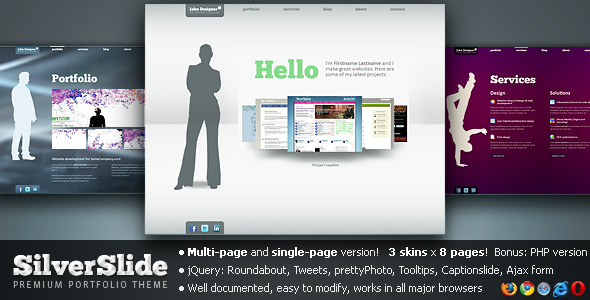
SilverSlide is a static HTML and PHP portfolio template sold on ThemeForest for $9, aimed at designers, photographers, musicians and other creatives who want a compact personal site without a content management system. The SilverSlide creative package ships as three separate builds — an eight-page multi-page HTML site, a single-page scrolling site and a PHP version assembled from includes — along with three colour skins and eight layered PSD files. It suits freelancers and small studios who are comfortable editing markup by hand and want a one-off portfolio rather than a platform they will keep extending.
What the SilverSlide creative package actually delivers
The download is not a single template but three, and picking between them is the first real decision a buyer makes. Each build covers the same eight pages: Home, Portfolio, Portfolio detail, Services, About, Contact, Blog and Blog post.
- Multi-page HTML — the conventional structure of separate files, best for a site with a real blog archive or a services section that deserves its own URL.
- Single-page HTML — every section stacked on one document with smooth scrolling handled by Ariel Flesler’s ScrollTo and LocalScroll plugins. Because each block gets a hash in the address bar, individual sections can be bookmarked and linked directly.
- Multi-page PHP — the same eight pages rebuilt with includes, so the header, footer and navigation live in one file instead of eight. That single change removes most of the repetitive editing from a multi-page build.
The portfolio machinery is the most substantial part of the template. Project thumbnails can be filtered by category, grouped into pages automatically, and opened in a detail view with an image caption slider and click-to-zoom behaviour. A PrettyPhoto lightbox handles larger images without leaving the page. On the homepage, a jQuery Roundabout carousel arranges featured work in a rotating ring, which gives a portfolio a focal point that a grid of thumbnails does not.
Smaller touches fill out the rest. The About page includes a rotating testimonials block for client quotes. The contact page submits through Ajax and validates entries in the browser using the jQuery Validate plugin, so mistakes are flagged before the form is sent. Nine silhouette graphics are bundled and can be swapped through a style switcher, which lets an owner change the visual tone without touching the CSS. Layout follows a tableless 960-pixel grid, headings are replaced with the ChunkFive typeface through Cufon, and the markup is written to XHTML 1.0 Strict.
Where SilverSlide creative fits and where it does not
The strongest fit is a self-employed creative with a defined set of work and no intention of publishing regularly. A photographer with three galleries, a musician promoting an album, or an illustrator with a dozen portfolio pieces can build the single-page version in an afternoon and never need a database, a login or a plugin update. Small studios also use templates like this for campaign microsites or temporary landing pages where content is fixed and the timeline is short.
There is a second, less obvious audience: someone learning front-end work who wants to see how Roundabout, PrettyPhoto, Validate and a local-scroll setup are wired together in a working page. The commented CSS and the PHP includes make the internals reasonably readable.
Buying it for a client who expects to edit their own content is the wrong move. SilverSlide creative has no admin panel, no media library and no draft workflow; every text change is a file edit followed by an upload. The same applies to any site that will grow — the Blog and Blog post pages are static layouts, not a publishing system. A business relying on search traffic from frequent articles, an online store, or a site built for a mobile-majority audience should look elsewhere.
What setting SilverSlide up involves in practice
Setup is straightforward for anyone who has edited HTML before. The archive is unzipped locally, one of the three builds is chosen, and the folder is uploaded to a host by FTP. The PHP version requires a server with PHP enabled, and the include paths need checking after upload if the folder sits in a subdirectory.
From there the work is content: replacing the placeholder images with optimised files, rewriting the copy across the pages in a code editor, and adjusting colours through the skin stylesheet. The contact form needs a recipient address or a form endpoint wired in, since the template only handles the browser-side validation step. A favicon is added, and if the ChunkFive headings need changing, the Cufon font file has to be regenerated — a step with more friction than a plain CSS font stack.