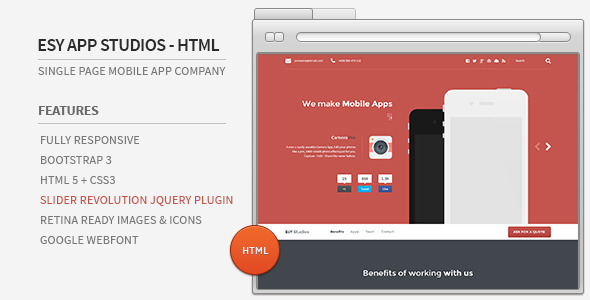
Esy App Studios – HTML Website is a single-page portfolio template for small mobile app studios, sold on ThemeForest for $15 by developer azyrusmax. It ships as a static HTML5 and CSS3 layout built on Bootstrap 3, with a Revolution Slider opening section, retina-ready image slots and a set of flat iPhone mockups. Of the various Esy App Studios Site Templates available, this is the plain HTML build rather than a CMS theme, which makes it a sensible fit for a freelancer or small studio that needs a cheap, self-contained app showcase page and is comfortable editing markup by hand.
What the Esy App Studios Site Templates Package Actually Includes
The download is deliberately narrow in scope. Everything sits on one long page, divided into sections that a visitor reaches by scrolling or by clicking an anchor link in the navigation. That structure suits an app studio with a short story to tell: a hero area, a few feature blocks, a mockup showcase and a contact prompt.
The layout is built on the Bootstrap 3 grid, and the practical benefit is predictability. Anyone who has worked with Bootstrap before already knows how the twelve-column rows behave, which makes rearranging sections or adding a new block a matter of copying existing markup rather than reverse-engineering a bespoke layout system. Column classes, spacing utilities and the responsive breakpoints all follow the framework’s conventions.
The header uses Revolution Slider, a jQuery-based plugin that ships inside the download. In practice this gives the page a full-width, animated opening panel with layered captions and transition effects, without the buyer having to license a slider separately. The trade-off is a heavy JavaScript dependency in the most prominent part of the page, and the plugin’s behaviour is configured through its own initialisation script rather than through the template’s main stylesheet.
Visual assets lean towards a flat, geometric style. The package includes flat mockups for the iPhone 4 and 5 form factors plus a set of 24 flat icons, which keeps the mockup showcase and the feature icons visually consistent without commissioning artwork. Icons elsewhere on the page come from Font Awesome, so common symbols such as social networks, arrows and contact details are available as a webfont rather than as image files.
Typography is handled with two Google-hosted families: Montserrat for headings and Source Sans Pro for body copy. Both are loaded from Google’s font service, which means no font files to manage, but also a third-party request on every page load. Retina-ready images and icons are promised, which in practice means the template expects double-resolution graphics so the layout stays sharp on high-density screens.
There are also social media sharing buttons, so a visitor can push an app page out to a network without the owner adding a third-party widget. Nothing on the page talks to a database: there is no blog, no search, no user accounts and no comment system.
Where Esy App Studios Site Templates Fit, and Where They Do Not
The strongest use case is a one-off marketing page for a studio with a small catalogue. A two-person team shipping one or two apps can put the mockups, a short feature list and contact details online in an afternoon, on any host that serves static files. It also works as a pre-launch holding page while an app is in review, and as a portfolio piece for a developer or designer who wants a presentable sample without building a layout from scratch.
Agencies pitching mobile work can use it as a fast concept shell: the sections are self-contained enough to reshuffle, and the flat mockups read as intentional design decisions rather than placeholders. Because the price is a one-time $15 with no subscription, cost is close to irrelevant for a client pitch.
It is the wrong choice in several common situations. A company that publishes regularly needs a content management system, and a static page means every new article or app listing is a code edit. A site that must hand off day-to-day editing to a non-technical marketing person will cause friction for the same reason. Anyone selling apps directly from the page needs a commerce layer that this template does not provide. And a project with strict performance, accessibility or security requirements should start from a modern baseline instead of retrofitting a 2014-era build.
Setting It Up in Practice
Prerequisites are modest: a text editor, an FTP or file-manager route into a web host, and enough HTML and CSS literacy to find a heading, swap a paragraph and replace an image path. No build tools, package manager or local server are needed, because there is nothing to compile — the files run as they are.
The realistic sequence is to unzip the download, upload the folder, open the main HTML file in an editor, and work through the sections in order: navigation labels, hero slider captions, feature copy, mockup images, contact details and footer links. The slider is the fiddliest part, since its slides are defined in the plugin’s own configuration rather than in plain markup.
Images deserve advance planning. The preview graphics are not part of the download, so the buyer supplies app screenshots and any photography. Because the template is built for retina displays, those assets should be exported at twice the displayed size, which means the image preparation step often takes longer than the HTML edits.
For a competent front-end developer, a first working version is roughly a two to four hour job: under an hour to deploy the stock layout, another hour or two to replace copy and imagery. Restyling colours and spacing, or rebuilding the slider behaviour, pushes it into a day. The vendor does not publish setup documentation details in the listing, so the code itself is the reference.
Strengths and Honest Limitations
Strengths
- Very low entry cost — a one-time $15 with no licence renewal or subscription.
- No database or CMS to patch, back up or migrate; a static page can be hosted almost anywhere, including cheap shared hosting.
- Conventional Bootstrap 3 grid, so developers who know the framework can extend the layout quickly.
- A premium slider plugin, a 24-icon flat set and iPhone 4/5 mockups are bundled, covering the visual pieces a small studio would otherwise source separately.
- Deliberately limited scope: one page, a handful of sections, little to break.
Limitations
- The last vendor update was June 2014. Bootstrap 3, jQuery and the bundled slider build are all from that era, and a jQuery slider of that vintage has been the subject of published security advisories; the code should be audited or replaced before it goes on a production domain.
- The preview artwork is excluded from the download, so buyers must supply their own screenshots, mockups and photography.
- No CMS means no blog, no search, no forms processing and no editorial workflow — every content change is a code change.
- A single page offers one title tag and one meta description, which limits how much search territory the site can cover.
- The animated slider adds noticeable page weight on mobile connections, which sits awkwardly against current Core Web Vitals expectations.
- 217 sales since release is a small install base by ThemeForest standards, so third-party tutorials and community fixes are thin; the vendor’s stated support terms are not detailed in the listing.
How Esy App Studios Site Templates Compare With the Wider Category
The alternative category splits into three broad groups. The first is modern one-page HTML templates, which use flexbox or CSS grid, ship without jQuery and target current performance budgets — more capable technically, but usually priced higher and less forgiving for someone who learned layout through Bootstrap.
The second group is multipurpose WordPress themes. Those bring a CMS, a page builder, plugin ecosystems and ongoing updates, at the cost of a larger download, a hosting stack with PHP and MySQL, and a maintenance routine. For an owner who will publish often or delegate editing, that trade is worth it; for a five-section app page, it is overhead.
The third group is free or near-free landing page builders and hosted page services. Those win on speed to launch and lose on portability and control — the page lives on someone else’s platform and carries that platform’s branding and limits. This template sits in the opposite corner: full file ownership, no recurring fee, and full responsibility for keeping the code current. Judged purely on capability per dollar for a static app showcase, it remains competitive; judged on maintenance and modern standards, it shows its age.
Frequently Asked Questions
Is Esy App Studios – HTML Website a WordPress theme?
No. It is a static HTML template that runs directly in a browser without WordPress, PHP or a database. The vendor’s listing mentions a WordPress version as a separate product that buyers can support by purchasing. Anyone expecting the theme customiser, plugins or a visual editor will not find them here.
Are the images shown in the preview included in the download?
No. The listing states plainly