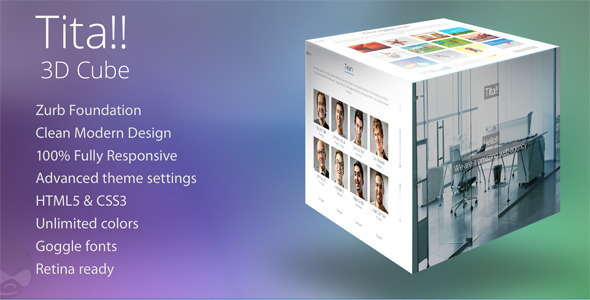
Tita!! – Modern 3D Drupal Theme is a multipurpose theme for Drupal 7 built on the Zurb Foundation framework, sold on ThemeForest for $48. It targets site owners who want a responsive, highly configurable Drupal theme with layered navigation and extensive theme settings, rather than a plain starter. It was last updated in January 2014 and has 202 sales, so it belongs to an earlier generation of Drupal theming and should be judged on that basis.
Tita!! Cms Themes: What the Theme Actually Delivers
The core proposition here is customization through settings rather than code. Tita!! ships with a large theme settings panel that exposes colour pickers, background image selection, Google Fonts choices, and other design controls from the Drupal administration area. For a site owner without front-end skills, that panel is the main value: changing a brand colour or swapping a hero background becomes a form submission instead of a stylesheet edit.
Underneath that, the theme is built on Zurb Foundation, a CSS framework that provides a responsive grid and pre-built components. Foundation was a common alternative to Bootstrap in that era, and using it means the underlying markup follows a documented, predictable system. Any developer who later extends the theme inherits a grid they may already know, and the theme’s responsiveness comes from that framework rather than from hand-written breakpoints.
Layout, navigation and visual treatment
The “3D” in the name refers to depth cues in the design language, and the vendor describes a three-dimensional, space-efficient navigation system with three levels of menu nesting. In practice this means a site with a deeper content hierarchy — parent pages, subpages and sub-subpages — can expose all three levels without a cluttered header. Large corporate and catalogue-style sites usually need that; brochure sites rarely do.
Supporting elements include Font Awesome icon fonts, HTML5 and CSS3 markup, custom background support, Google Maps embedding, and threaded comments. Threaded comments matter more than they sound: they let readers reply to individual comments rather than posting into a flat list, which is what most Drupal 7 blog configurations require to feel conversational.
Performance, SEO and documentation
The listing claims SEO optimisation and clean design. In a Drupal 7 context, “SEO optimised” from a theme almost always means semantic markup, sensible heading order and fast-loading assets, not extra metadata handling — that job belongs to modules. Buyers should treat the claim as a baseline rather than a differentiator.
Mymoun, the developer, bundles written material with video tutorials and offers dedicated support. Video walkthroughs are genuinely useful for a settings-heavy theme, because a 40-option admin panel is hard to communicate in a text readme. Two hundred and two sales is modest but non-trivial; the listing does not display a rating summary in the supplied data, so there is no reliable quality signal from reviews to point to.
Where Tita!! Fits and Where It Does Not
The strongest fit is an existing Drupal 7 site that needs a visual refresh without a rebuild. An agency inheriting a Drupal 7 install, or a business whose site is stuck on a dated theme, can install Tita!! and use the settings panel to modernise colours, typography, backgrounds and layout without touching the module stack or migrating content. That is a realistic, low-risk engagement.
It also suits corporate and small-business brochure sites with a three-tier content structure, and blogs that want threaded discussion and a distinctive visual identity. Freelancers who build multiple Drupal 7 sites for similar clients can reuse the settings panel to differentiate each project quickly.
It is the wrong choice for a new project in 2024 or later. Drupal 7 reached official end of life in January 2025, meaning no more security releases from the Drupal community. A theme updated in 2014 has had no maintenance for over a decade. Anyone starting fresh should be on Drupal 10 or 11, where this theme cannot run at all — theme code is not portable across major Drupal versions. It is equally wrong for a site that depends on Layout Builder, a component-based page builder, or modern editorial workflows, since those did not exist in Drupal 7.
Setting Up Tita!! in Practice
Prerequisites are non-negotiable: a working Drupal 7 installation with a compatible PHP version and MySQL or MariaDB database. Without a live Drupal 7 environment, the theme cannot be evaluated meaningfully. Installation itself follows the standard Drupal route — upload the theme package to the sites/all/themes directory or install it through the appearance admin page, then enable it and set it as default.
After activation, the real work begins in the theme settings. Expect to spend roughly one to three hours on configuration: choosing a colour scheme, setting backgrounds, selecting Google Fonts, configuring the menu regions for the three navigation levels, and testing the layout at mobile widths. Foundation’s grid handles most of the responsive behaviour, but images and embedded maps still need checking at each breakpoint.
Content and module dependencies add time. Threaded comments require Drupal’s comment module configured for threading. Google Maps embeds need an API key in most cases, and Drupal 7’s mapping modules have their own setup. Site owners should budget a half day for a confident setup and longer if the existing site needs content restructuring to fit the menu depth. The vendor’s video tutorials shorten the learning curve for the settings panel considerably.
Strengths and Limitations
Strengths
- A genuinely deep settings panel that lets non-developers change colours, fonts and backgrounds without editing CSS.
- Built on Zurb Foundation, giving developers a documented responsive grid they can extend predictably.
- Three navigation levels are supported out of the box, which suits sites with a deep content hierarchy.
- Threaded comments, icon fonts and Google Maps embedding are included rather than left to separate modules.
- Video tutorials and dedicated vendor support reduce the cost of learning a settings-heavy admin.
Limitations
- The last vendor update was 23 January 2014, so the theme has had no maintenance for more than a decade and receives no security patches.
- It runs only on Drupal 7, which has passed end of life; it cannot be installed on Drupal 9, 10 or 11, and there is no migration path for the theme itself.
- No page-builder or block-based layout editing exists, so layout changes still require Drupal’s region and block system.
- The $48 price buys an as-is product, and buyers should assume no further compatibility work from the author.
- Sales volume is modest and the listing supplies no rating figure, so there is little third-party evidence of long-term reliability.
How Tita!! Cms Themes Compare With the Wider Category
Modern commercial themes in this category compete on block-based editing, full site editing patterns, accessibility compliance and frequent compatibility updates with current CMS releases. Tita!! competes on a different axis: breadth of built-in design settings for a single, older platform. Judged against current themes, it lacks the visual editing model nearly every buyer now expects.
Against free Drupal 7 base themes such as a Zen or Bootstrap subtheme, Tita!! wins on convenience — the settings panel replaces hours of subtheme CSS work — and loses on flexibility for developers who prefer writing their own styles. Against premium multipurpose themes on the current Drupal generation, it is simply a different product for a different platform, and no amount of configuration closes that gap.
The honest framing is that this is a legacy purchase. It makes sense when the alternative is an unstyled Drupal 7 site and a bigger budget, and not when the alternative is a planned migration to a supported Drupal version.
Frequently Asked Questions
Does Tita!! work with Drupal 10 or Drupal 11?
No. Tita!! is built for Drupal 7 only, and theme code does not carry across Drupal’s major version changes. The theme cannot be installed or enabled on Drupal 9, 10 or 11, and the vendor has published no updated version. Sites on those releases need a theme developed for that generation, which means treating this as a platform mismatch rather than a fixable compatibility issue.
Is Tita!! safe to use now that Drupal 7 has reached end of life?
It carries real risk. Drupal 7 stopped receiving community security releases in January 2025, so vulnerabilities found afterwards go unpatched at the platform level, and this theme has had no maintenance since 2014. Sites handling payments, personal data or logins should not be running on it. Low-traffic, internal or archived sites present a smaller but still non-zero exposure.
Do I need coding skills to customise the theme?
Largely no. The theme settings panel handles colour schemes, background images, Google Fonts and logo placement through the Drupal admin interface, and the vendor supplies video tutorials walking through it. Deeper changes — altering Foundation grid classes, restructuring regions, or overriding templates — do require HTML, CSS and some PHP knowledge, so developer help is needed for anything beyond surface styling.
What is included in the $48 purchase?
The theme package, its design settings, bundled free demo images, and access to the vendor’s documentation and video tutorials. Mymoun lists dedicated support as a feature, though the 2014 update date makes prompt responses unlikely. Buyers should treat the purchase as an as-is licence for one legacy theme rather than an ongoing subscription with future updates attached.
Verdict
Buy Tita!! only if a Drupal 7 site already exists and needs a faster, more configurable front end without a rebuild — an agency refreshing an inherited install, or a business that cannot yet fund a migration. The settings panel, Foundation base and three-level navigation do real work for that audience, and the price is low for the time saved. Do not buy it for a new build, for anything on a supported Drupal version, or for a site with security or compliance obligations; the 2014 update date and Drupal 7’s end of life make those use cases untenable. Treat the purchase as a stopgap with a defined shelf life, not as a long-term platform decision.