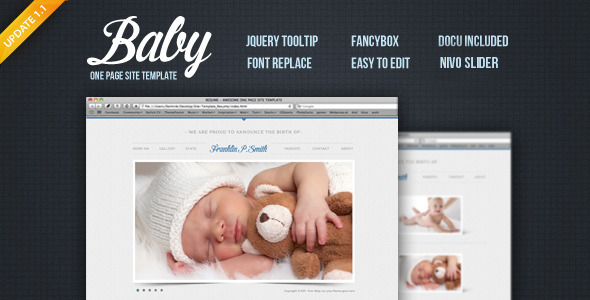
A single-page announcement layout for a new arrival, the Baby creative template sells on ThemeForest for $10 and has recorded 206 sales since it was listed. It bundles a full-width Nivo image slider, a photo area and pre-written text blocks for date of birth, birthplace and a short family message into one HTML page that a buyer fills with personal pictures. It is aimed at parents, newborn photographers and small studios that want a self-hosted keepsake page rather than a social media post, and it assumes no content management system behind it.
What the Baby creative Site Template Actually Gives You
The template is built as a single scrolling page rather than a set of linked pages. Sections stack vertically, so a visitor lands on the slider, scrolls through photographs and reaches the written details without any navigation decisions. For an announcement that carries one message, that structure removes the usual layout work entirely.
The image slider is the centrepiece. Version 1.1 of the template added Nivo Slider, a long-standing jQuery plugin that rotates images with configurable transitions. In practice this means a buyer can lead with four or five photographs of a newborn and let them cycle automatically, rather than choosing one hero image and hiding the rest. The vendor does not document which Nivo options are exposed in the build, so animation speed and transition style would need to be checked in the included script.
Placeholder artwork fills every photo slot. Replacing it is a matter of overwriting image files or pointing the markup at new ones, which is the main reason the Baby creative design can be personalised without any design skill. Photos should be cropped to match the existing dimensions; otherwise the slider and gallery frames distort them.
Text areas are set up for the details families usually want to publish: the birth date and time, weight and length, the hospital or birthplace, the names of parents and siblings, and a short welcome message. The vendor tags also point at adjacent uses, listing birthday, church, mother and father, so the same layout can carry a christening, a naming ceremony or a first birthday with modest rewording.
Editing happens in a text editor against HTML and CSS files. Documentation is included, which matters here because there is no admin panel to explore. The vendor also points to a separate Baby brochure template on GraphicRiver for anyone who wants a printed piece that matches the website, and notes that the design has been featured on cssmania.com, a website showcase gallery. That showcase is a display listing rather than an award, but it is a reasonable signal that the visual work holds up.
Where the Baby creative Template Fits, and Where It Does Not
The obvious fit is a personal announcement site: a parent buys a domain, uploads a handful of photographs and shares one link with family and friends. Newborn photographers can use the same layout as a sample deliverable or a gift to clients, since the styling already looks like a finished commission rather than a blank page. Freelancers who occasionally get asked for a small one-page site for a christening or a first birthday can keep the files on hand and turn one around quickly.
The template is the wrong choice in several common situations. It is not suitable for anything that needs more than one page, such as a photo blog with dated entries, a guestbook that accepts submissions, or an RSVP form that stores responses, because nothing in the listing describes server-side processing. It is a poor fit for a client who wants to update text without touching code, since every edit means re-uploading a file. And it should not be used for a long-lived commercial project: a build last touched by its developer in September 2011 carries no maintenance commitment, and that risk belongs to the buyer.
What Setting the Baby creative Template Up Involves
Prerequisites are modest. A buyer needs web hosting with file access through FTP (file transfer protocol, the standard way of copying files to a server) or a hosting control panel’s file manager, a plain text editor, and image software for cropping photographs to size. The vendor tags and the absence