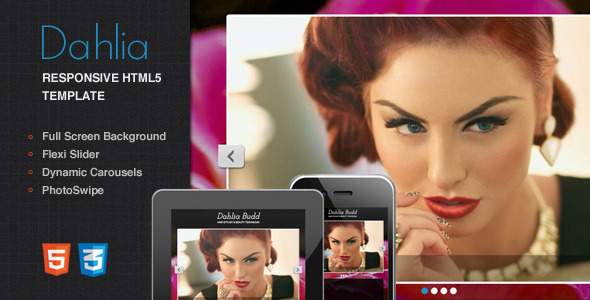
Sold on ThemeForest for $11, Dahlia is a single-page HTML5 template aimed at hair salons, nail technicians, makeup artists and small beauty studios that want a photographic portfolio site without running a content management system. It packs a full-screen background, a large image slider, an accordion, lightbox galleries, a carousel and a contact form into one scrolling page, with the source files needed to recolour the interface. The Dahlia health-beauty package suits a studio with a fixed set of photos and copy; it is a poor choice for anyone who expects to publish new content weekly or needs bookings handled inside the site.
What the Dahlia health-beauty template actually delivers
The template is built around a single long page rather than a set of linked sections, and most of its features exist to keep that page navigable and visually dense.
Full-screen imagery. A script called FullScreenr stretches one background image to fill the browser window at any size. In practice this gives a salon a strong opening impression without hand-cropping the same photo for several screen widths.
A large hero slider. FlexSlider drives the main slideshow. The benefit is a rotating set of treatments, offers or before-and-after shots at the top of the page, which is where most visitors decide whether to keep scrolling.
Two lightbox systems. Gallery images open in PrettyPhoto for mouse-driven browsers and in PhotoSwipe for touch devices. Having both means the same gallery behaves sensibly on a desktop and on a phone, which is more than many templates at this price bother with.
A scroll-to-top accordion. Service descriptions, price lists or FAQs collapse into expandable rows. On a one-page site this is the main tool for fitting a lot of text without turning the page into a wall of copy.
Carousels and a blog layout. Dynamic carousels handle testimonials or thumbnail strips of recent work. There is also a separate full-page article design, which is useful for a single news item, a promotion or a stylist profile, even though the template is not a blogging platform.
Editable branding assets. The package includes PSD files for the map button, the icons and the navigation buttons. Those layered source files mean a colour scheme can be rebuilt to match a salon’s brand rather than accepting the default palette. Google Web Fonts handle typography, and the markup is described as valid HTML5 with CSS3 styling and commented, documented code.
Where the Dahlia health-beauty template fits, and where it does not
The strongest fit is a new or small studio with a finished set of professional photographs and a short list of services. A single-location salon, a freelance nail artist, a makeup specialist building a first portfolio, or a hairdresser who already takes bookings by phone or through an external system can all use this template as a credible brochure site. It also works as a landing page for a specific campaign, or as a quick base for a freelancer who wants to hand-code the rest.
It is the wrong choice for a multi-branch chain that needs a page per location, for a spa that wants online booking or product sales inside the site, and for any business that intends to publish offers, staff changes or seasonal menus without opening a code editor. A single-page structure also limits search visibility: there is one address to rank, not a separate page for each treatment a customer might search for.
Setting up the Dahlia health-beauty template in practice
No CMS, database or theme installer is involved. The prerequisites are a web host, FTP or SFTP access, a plain text editor and enough HTML and CSS knowledge to find and replace text and image paths. The download includes a documentation folder that walks through the file structure.
The realistic sequence is: upload the package, open the main HTML file, swap the placeholder photographs for the salon’s own images at appropriate dimensions, rewrite the headings and service copy, then adjust colours in the stylesheet or by editing the supplied PSDs. The contact form needs a server that can send mail, or a third-party form endpoint, and should be tested with a real submission before launch. Budget two to four hours for a straight content swap with existing photography, and closer to a full day if the colour scheme, fonts and icons all need reworking. Image preparation, not code, usually takes the longest.
Strengths and limitations in plain terms
Strengths
- A one-off $11 price with no subscription, and 228 sales recorded on the marketplace — modest, but enough to suggest the template has been used in real projects.
- Two lightbox libraries covering touch and mouse input, which is unusual at this price point.
- Layered PSD source files for the icons, map button and navigation, so rebranding does not require rebuilding graphics from scratch.
- Documented, commented code and valid HTML5 markup, which keeps hand-editing predictable.
- Everything lives on one page, so there are no plugins, updates or database migrations to manage.
Limitations
- The vendor’s last recorded update is 16 April 2016. The bundled scripts, including FlexSlider, PrettyPhoto and jQuery, are from that era, and the listing makes no claim about compatibility with current browser or PHP versions.
- Every word and image change is a code edit. There is no admin panel, no draft workflow and no way for a salon owner to update the site without help.
- The contact form is described as working, but