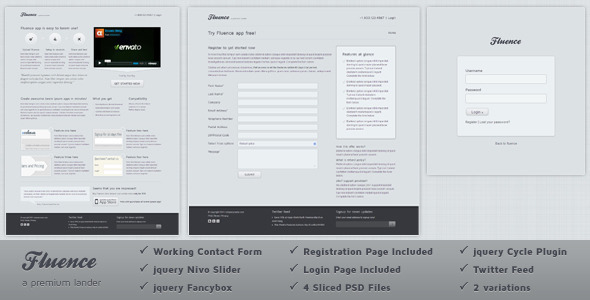
Fluence Landing Page is a static HTML and CSS template built for promoting a mobile app, desktop software product or online marketing campaign. It ships with two page variations, a working contact form, a separate registration and login page, and four layered PSD source files, and it is sold on ThemeForest for $12. It suits freelancers and small teams who want a single promotional page live quickly without installing WordPress or a page builder.
The item sits in the ThemeForest Apps category, which tells you a lot about the intended buyer: someone with a product to launch and a budget measured in dollars rather than hours of developer time. The author, tansh, has kept the package small and the scope narrow, and that narrowness is both the appeal and the problem.
What Fluence Landing Page Apps Templates Actually Include
Fluence Landing Page Apps templates are best understood as a front-end starting point rather than a complete marketing system. The package delivers a finished visual layer plus a handful of small scripts, and everything else — hosting, email delivery, content, analytics — is left to the buyer.
Two home page variations with pattern options
The main page comes in a video version and a slider version. Each variation is available with five background patterns, which gives ten visual starting combinations from a single purchase. The slider is powered by the Nivo Slider jQuery plugin, a long-standing script for image transitions with captions and navigation arrows. In practice this means a buyer can present a hero video, a set of product screenshots, or a patterned brand background without touching the layout code.
Supporting screens beyond the landing page
Most single-page templates stop at the landing page itself. Fluence adds a dedicated registration page, a contact page, and a login screen. The login page is markup and styling only, with no authentication logic behind it, so it works as a visual placeholder or as a shell that a developer later wires into a real application. That distinction matters: anyone expecting a functioning membership system will be disappointed, but anyone who simply needs the screens to look consistent will find them ready to use.
Forms and email handling
The contact form sends mail through PHP, and the subscribe box does one job: it forwards the subscriber’s email address to a nominated recipient. There is no list management, no double opt-in, and no integration with an email service provider. The vendor is also explicit that the thank-you message which replaces the contact form after submission is produced by jQuery rather than server-side PHP, and that consequently no security guarantee is offered. That is an unusually candid disclosure and worth taking at face value. The same mechanism can display a download link alongside the confirmation, which is a neat trick for gated file delivery even if it is not a secure one.
Design assets and front-end extras
Four well-layered and sliced PSD files are included, so a designer can edit the layout in Photoshop rather than reconstructing it in CSS. The template also bundles the Cycle plugin for content rotation, Fancybox for lightbox popups, Cufon for custom font replacement, and a Twitter feed widget. Cufon was a common workaround for web font limitations before broad browser support for the CSS @font-face rule, and it is now largely obsolete. The Twitter feed script was updated in October 2012.
Where Fluence Landing Page Apps Templates Fit, and Where They Do Not
The strongest fit is a pre-launch or early-launch app with a small marketing budget. A developer who has built an Android or iOS product and needs a credible one-page site with a features section, screenshots, a signup box and a contact route can have Fluence Landing Page running in an afternoon. The same applies to a desktop software vendor, a SaaS side project, or an agency building a temporary campaign page for a client’s product announcement.
The video variation is particularly useful for apps where motion demonstrates value: a game, an editing tool, a fitness tracker. The slider variation suits a product better explained through a sequence of static screens.
It is the wrong choice in several common scenarios. Anyone who needs to publish blog posts, manage multiple pages, or hand editing control to a non-technical colleague should use a CMS theme instead, because every text change here means opening an HTML file. Projects with strict accessibility or performance budgets will find the bundled jQuery plugins, lightbox scripts and Cufon replacement add weight and complexity that a hand-built page would not carry. And any site that must comply with modern data protection expectations should not rely on the PHP mail script or the client-side thank-you message; a form service or a properly configured server-side handler is the safer route.
Buyers should also note the age of the package. The most recent update recorded by the vendor is from October 2012, which means the code predates responsive design becoming standard. Nothing in the listing describes mobile breakpoints or a fluid grid, and the vendor does not state that the layout adapts to phone screens. A buyer should assume it does not unless they verify otherwise.
Setting Up Fluence Landing Page in Practice
Prerequisites are modest but real. The buyer needs a web host with PHP enabled to make the contact form and subscribe box work, a text editor for content changes, and Photoshop or a compatible editor if the PSD files are to be used. No WordPress installation, database, or build tool is involved, which removes most of the usual setup friction.
The practical sequence is: download and unzip the package, choose the video or slider variation, upload the folder to the server, then edit the HTML to replace the placeholder copy, screenshots and links. The PHP mail recipient address needs to be set in the form handler, and the Twitter feed widget needs an account reference. The PSD files are optional and only come into play if colours, spacing or imagery need to change beyond what CSS edits allow.
For someone comfortable with HTML, the whole process is a few hours at most, with most of that time spent on content and images rather than code. For someone who has never edited a template, expect a longer first pass, and budget for a developer if the site must be responsive or if the forms need to be reliable. Testing the contact form on the live server early is worthwhile, since PHP mail configuration varies between hosts and a form that looks fine locally can silently fail once deployed.
Strengths and Limitations of Fluence Landing Page
Strengths
- Low cost of entry at $12, with no recurring licence or subscription.
- Two page variations and five patterns each, giving useful visual flexibility from one purchase.
- PSD source files included, so design changes do not require rebuilding layouts from scratch.
- Registration, contact and login screens included, producing a coherent set rather than a lone page.
- The vendor documents the security caveat around the jQuery thank-you message instead of hiding it.
- 233 sales and a small, focused file set make it easy to inspect before committing.
Limitations
- Last updated in October 2012; the jQuery libraries and the Cufon font replacement are dated, and Cufon in particular is a legacy technique with no modern equivalent use case.
- The listing makes no claim of responsive behaviour, so mobile layout is unverified and likely absent.
- The subscribe form only emails an address to a recipient; there is no list storage, opt-in confirmation, or integration with mailing platforms.
- The login page is presentation only, with no working authentication.
- The post-submission message is rendered client-side, which the vendor states carries no security guarantee.
- No CMS, no page builder, and no visual editing — every change is a code edit.
How Fluence Landing Page Apps Compares With the Wider Category
The general alternatives fall into three groups: multipurpose HTML landing page packs, WordPress landing page themes and builders, and hosted page builders such as dedicated SaaS tools.
Multipurpose HTML packs usually cost more but bundle dozens of layouts and modern, responsive grids. Fluence Landing Page Apps competes on simplicity and price rather than breadth — it does one thing and does not pretend otherwise. Buyers who only need one page for one product will find the extra layouts in a larger pack go unused.
WordPress-based options win decisively on content management. Editing copy, swapping images and adding sections happen in a browser, and non-technical stakeholders can be given access. The trade-off is hosting complexity, plugin updates and ongoing maintenance. Fluence avoids all of that but cedes all of the convenience.
Hosted page builders offer the fastest path to a live page and handle forms, email and responsive layout out of the box, usually for a monthly fee. Over a couple of years that fee exceeds the one-off $12 many times over, but the buyer is paying for infrastructure rather than markup. Against both, Fluence’s advantage is a clean, self-contained static page with no dependency on a third-party platform.
Frequently Asked Questions
Is Fluence Landing Page responsive on mobile phones?
The vendor does not state that it is. The listing describes a fixed HTML and CSS layout and makes no mention of media queries, fluid grids or mobile breakpoints, and the code dates from an era before responsive design was standard. Buyers should assume the page needs manual responsive work or a separate mobile stylesheet before it is used on a phone-first audience.
Does Fluence Landing Page require WordPress?
No. It is a static HTML and CSS template that runs on any web server, with PHP needed only for the contact form and the subscribe box. There is no theme installation, no database and no admin dashboard. That makes deployment simple, but it also means all content edits happen in the HTML files rather than in a browser interface.
Can the contact form send email without extra configuration?
Not reliably. The form uses PHP mail, which depends on the host’s mail configuration and often requires a verified sending domain to avoid spam filtering. The recipient address must be set inside the handler before use, and the vendor notes that the thank-you message is generated by jQuery rather than PHP, so it carries no security guarantee.
What do the included PSD files cover?
Four layered and sliced Photoshop files are bundled, matching the template’s page designs. They let a designer adjust colours, typography and imagery at the source rather than reverse-engineering the CSS. The vendor does not itemise which screens each file corresponds to, so buyers should open the package and check the coverage before planning design work around them.
Verdict on Fluence Landing Page
Buy Fluence Landing Page if the goal is a single, good-looking promotional page for an app or software product, the budget is tight, and someone on the team is comfortable editing HTML. The included PSDs, the registration and login screens, and the two layout variations deliver reasonable value at $12, and the vendor’s honesty about the form’s limitations is a point in its favour.
Skip it if the site must work well on phones, if content will be updated by non-developers, if a mailing list needs proper management, or if the project has any modern security or accessibility requirement. Those needs point to a maintained WordPress theme, a hosted page builder, or a custom build.
For a short-lived campaign page or a pre-launch holding site, the dated code is manageable. For anything intended to run for years and grow, the lack of updates since 2012 is a real liability rather than a minor caveat.