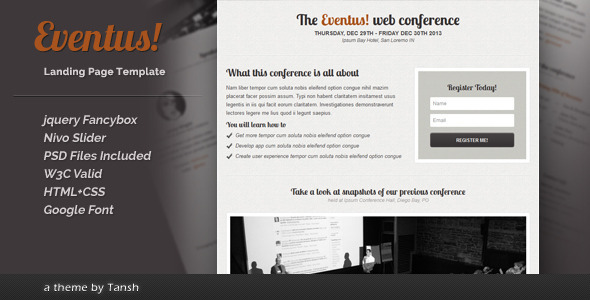
Built to promote one event on a single scrolling page, Eventus Entertainment is a static HTML template selling on ThemeForest for $16. It bundles a coded landing page, layered PSD design files and a plain email capture form, aimed at freelancers, agencies and small teams that need a fast promotional page for a conference, seminar, webinar or corporate meeting without running a content management system. The item has 232 sales and received its most significant update in February 2025, when developer tansh added mobile responsiveness and refreshed the bundled libraries.
What Eventus Entertainment Delivers Beyond the Screenshot
The template is one page, not a site. Everything a visitor needs — the event pitch, the speaker faces, the registration prompt — sits on a single URL that people scroll through, which suits a fixed-date event where there is exactly one action worth taking.
The February 2025 update matters more than the changelog suggests. Before it, the layout was desktop-only; the current version reflows on phones and tablets, which is where most traffic from a social post will land. The same release swapped the Fancybox lightbox script for Venobox (a lightbox is the overlay that opens images or video without leaving the page) and updated the CSS and JavaScript dependencies.
Designers get layered, sliced PSD files. “Sliced” means the artwork is cut into individual web-ready assets and “layered” means every element stays editable, so a rebrand can start from the original composition rather than from a rebuilt grid. That is unusual at this price point and it is the strongest argument for choosing this template over a free alternative.
Under the hood the package includes commented markup and claims W3C validation, meaning the HTML passes the standards checker. In practice that reduces the odds of a section collapsing in one browser and not another, and it makes handover to another developer less painful. Typography runs on Google Fonts, so swapping the typeface is a one-line change rather than a font-hosting exercise.
The subscribe form is deliberately minimal: it forwards a visitor’s address to a recipient inbox. Nothing is stored, no list is built, and no third-party email service is wired in. That is a real constraint, covered below.
Where Eventus Entertainment Fits, and Where It Does Not
The natural home for this template is a one-off event with a known date and a short promotional runway: a single-track conference, a summit, a workshop, a seminar series announcement, a corporate AGM or a webinar registration page. It also works as an agency microsite — a designer takes the PSDs, restyles them to a client’s brand, and delivers a lightweight page in days rather than weeks.
It is the wrong choice in several common situations. Anyone planning a calendar of recurring events needs a database, and this template has none; every edit means opening the HTML file. Projects that sell tickets, cap seats, issue QR codes or reconcile payments need registration logic that a static page cannot provide. WordPress users should stop here, because this is not a theme and will not install into a CMS. Teams that need subscriber data in Mailchimp, HubSpot or similar should also look elsewhere, since the form only relays an address. Finally, an event with no photography budget will struggle: the demo images are licensed for preview only and are not in the download.
What Launching the Eventus Entertainment Page Involves
Setup assumes a text editor, FTP or file-manager access to a web host, and image software that opens PSD files. There is no build step, no package manager and no server-side framework to configure — unzip, edit, upload.
The practical sequence is: replace the placeholder copy, drop in your own licensed imagery, adjust the font link and colour values if rebranding, then point the subscribe form at a working mail handler. The vendor does not document the form’s backend, so it is worth confirming with the host that outgoing mail is permitted before launch. After that, the page needs a pass on a real phone, a check of the meta title and description for search snippets, and a favicon.
For a straight content swap, an afternoon is realistic. Restyling from the PSDs to match a client brand is closer to one or two working days. Budget extra time for sourcing photography, which is the step most often underestimated.
Strengths and Limitations in Plain Terms
Strengths
- A low one-time price of $16 with no subscription or per-seat cost.
- Editable, sliced PSDs give a designer full control over the visual layer.
- Commented, standards-validated markup keeps future edits and handovers manageable.
- Static output loads quickly and runs on cheap hosting, with no plugins to patch or database to back up.
- The 2025 update brought genuine mobile support and fresher libraries rather than cosmetic tweaks.
Limitations
- The subscribe form is a relay, not a mailing list tool: no stored subscribers, no double opt-in, no integration with an email platform.
- Demo photography is excluded from the download, so a real image budget is unavoidable.
- Single-event scope only — no agenda management, ticketing or multi-event structure.
- Content lives in the HTML file, so copy changes require either a developer or comfort with code.
- Support runs through Envato’s guidelines from a single author, and there is no public documentation or community forum to fall back on.
How Eventus Entertainment Compares With Other Ways to Build an Event Page
Against WordPress event themes and calendar plugins, this template gives up management features — recurring dates, ticketing hooks, speaker taxonomies — in exchange for speed, simplicity and near-zero maintenance. A WordPress build makes sense when events repeat; a static page makes sense when one event is the whole story.
Against general-purpose page builders, the trade is flexibility versus restraint.