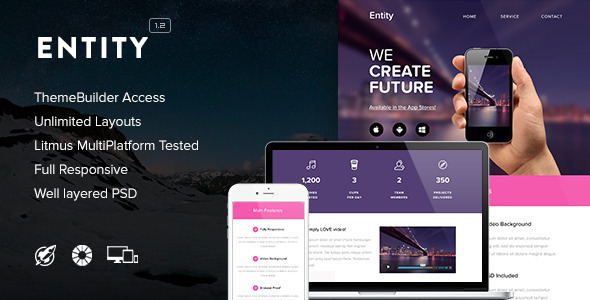
Entity Email Templates is a responsive HTML email template package sold on ThemeForest by the developer RocketWay, priced at $19. It ships with a set of pre-built email layouts plus access to a browser-based drag-and-drop builder that lets buyers assemble their own designs without writing HTML. It is aimed at freelancers, agencies and small marketing teams that need branded campaign emails but do not want to code table-based markup from scratch.
The listing has accumulated 563 sales, which is a modest but real signal of adoption in a crowded category. The product was last updated by the vendor in February 2015, and that date matters more here than it would for most software, because email client rendering changes constantly.
What Entity Email Templates Actually Lets You Build
The core of the package is a library of responsive email layouts. Responsiveness in email is handled differently from websites: because most email clients strip out external stylesheets and many ignore modern CSS, the templates use inline CSS plus media queries, which are conditional rules that apply different styles depending on the width of the screen reading the message. That combination is the standard, reliable approach, and it means a single template can reformat itself for a phone, a tablet and a desktop inbox.
The themebuilder is the more interesting half. Rather than editing raw HTML, buyers open a link supplied in the download folder and get access to a full unlocked builder. Inside it, modules can be dragged and dropped into place, duplicated, or hidden entirely, which makes it practical to reuse one structure for several campaigns without rebuilding from zero. Background images and patterns can be swapped, and the vendor states that structures and colour schemes are unlimited, so the layouts are starting points rather than fixed designs.
Two details are worth flagging. First, the builder files themselves are not included in the download — only a link that grants access — so the product depends on the vendor’s server staying online. Second, a layered Photoshop file is bundled alongside the HTML, which is genuinely useful for teams that need to match an email to an existing brand kit or produce matching banner graphics.
On fonts, the templates support the premium Proxima Nova typeface. RocketWay holds a licence that extends usage to its customers, with the condition that the font files are hosted on RocketWay’s servers rather than self-hosted. Custom web fonts render in iOS Mail, Apple Mail, the default Android client and Thunderbird; other clients fall back to a standard web-safe font. That fallback behaviour is normal for email and not a defect, but it does mean the typography will not look identical everywhere.
Compatibility is broad on paper: Gmail, Yahoo Mail, Apple Mail, Outlook, Hotmail, Thunderbird, Eudora, Foxmail, IncrediMail, Opera Mail, Sparrow, Spicebird, and iOS devices. The listing is also candid about the gaps. Outlook does not support background images, Gmail ignores CSS background stretching unless a very wide image (around 2000px) is uploaded, and the Gmail app for Android is listed as unsupported outright.
Where Entity Email Templates Fits, and Where It Does Not
The strongest fit is an agency or freelancer producing recurring campaign emails for clients who use MailChimp, iContact or Campaign Monitor. All three are named as supported services, and the templates have been tested with Litmus, the industry-standard rendering test tool, which suggests the vendor checked output across clients rather than assuming it worked.
It also suits a small business that wants a one-off promotional or product announcement email and has no developer on hand. The drag-and-drop builder removes the need to understand table layouts or media queries, and the $19 price is low enough to treat as a disposable cost on a single campaign.
It is a poor fit for anyone who needs a transactional email system — order confirmations, password resets, shipping notifications. Those require dynamic merge fields and often conditional logic, and the listing explicitly notes that repeater tags and layout tags were not included, so Campaign Monitor’s builder will not expose every feature. Anyone expecting the template to behave like a full email platform will be disappointed.
It is also the wrong choice for a team that needs guaranteed long-term maintenance. The last vendor update was in 2015, and email clients have changed substantially since then.
What Setup Involves
Installation is not a software install. The buyer downloads a folder, opens the Themebuilder subfolder, and follows a link to reach the online builder. From there, the workflow is: choose a starting structure, drag in modules, replace placeholder images and copy, then export to desktop as HTML. That exported file is what gets imported into MailChimp, iContact or Campaign Monitor.
The prerequisite most people underestimate is image hosting. Because the HTML references images by URL, those assets need to live somewhere publicly accessible before the email is sent, or recipients will see broken placeholders. The stock photography shown in the demo is credited to Death to the Stock Photo and is not included, so replacement imagery has to be sourced separately.
A straightforward campaign can realistically be assembled and exported in an afternoon. Matching an email precisely to an existing brand — custom fonts, exact colours, bespoke imagery — takes longer, and the Photoshop file is what makes that possible. No coding is required, but a basic understanding of how email clients differ helps considerably when troubleshooting.
Strengths and Limitations
Strengths
- Drag-and-drop builder with module duplication and hiding, which speeds up producing multiple variations of one campaign.
- Inline CSS with media queries — the correct, widely supported method for responsive email.
- Named compatibility with MailChimp, iContact and Campaign Monitor, plus Litmus testing.
- Layered Photoshop file included, which is uncommon at this price point.
- Licensed access to Proxima Nova, removing a font-licensing headache for commercial campaigns.
- Clean, commented code, which makes manual edits feasible when the builder is not enough.
Limitations
- No updates since February 2015. Email client rendering has shifted since then, and there is no indication of ongoing maintenance.
- The themebuilder is not included in the download — it is a link to an external tool, so the product depends on RocketWay continuing to host it.
- Campaign Monitor support is partial: repeater and layout tags are absent, so not every builder feature is available after import.
- Background images do not render in Outlook at all, and require an oversized image workaround in Gmail.
- The Gmail app for Android is explicitly unsupported, which is a significant gap given how much email is opened on Android phones.
- Proxima Nova only works if the font files stay hosted on RocketWay’s servers, which is a dependency outside the buyer’s control.
- Stock photography is not included, so imagery must be sourced and hosted separately.
How Entity Email Templates Compares to the Wider Category
Email template marketplaces broadly split into three groups. The first is static HTML template packs — a folder of finished designs that must be edited by hand. Entity is more flexible than those because of the builder, but it inherits their limitation: once exported, further changes mean re-editing HTML or returning to the builder.
The second group is subscription-based email builders tied to a sending platform, such as the native editors inside MailChimp or Campaign Monitor. Those offer tighter integration, automatic image hosting and continuous updates, but they lock the design into that platform and typically cost far more over time. Entity’s advantage is portability — one exported file can be imported into several different services.
The third group is modern standalone email builders with live previews, collaboration and current client-testing libraries. Entity cannot compete on freshness or on the breadth of its testing, and the 2015 update date is the clearest dividing line. What it retains is a low one-time price, a Photoshop source file, and a font licence that most cheap alternatives do not bundle. For a single campaign on a tight budget, that trade-off can still make sense. For anything ongoing, the maintenance gap is hard to ignore.
Frequently Asked Questions
Is the Entity themebuilder included in the download?
No. The download contains a folder with a link that grants access to the full unlocked themebuilder, which runs separately. The builder files themselves are not bundled. This means the tool depends on RocketWay keeping that service available, and buyers should factor that dependency in before purchasing.
Does Entity Email Templates work with MailChimp and Campaign Monitor?
Yes, both are listed as supported, along with iContact. Templates are imported as HTML after export from the builder. Campaign Monitor support is partial, however: repeater tags and layout tags were not included, so text, buttons and images can be edited there but not every builder feature carries across.
Why do background images not show in Outlook or Gmail?
Outlook does not support CSS background images at all, so they simply will not appear. Gmail ignores background stretching, and the vendor’s workaround is uploading a very wide image, around 2000 pixels, so it fills the space. Both are client limitations rather than template faults.
Can Entity Email Templates be used for transactional emails?
Not well. The templates are built for campaign and promotional emails, and the listing notes that repeater and layout tags are absent. Transactional messages such as receipts or password resets need dynamic merge fields and conditional logic that this package does not provide. A dedicated transactional email service is the better route.
Verdict
Entity Email Templates is a reasonable buy for a freelancer or small team that needs one or two branded campaign emails quickly, wants a Photoshop source file to work from, and is comfortable accepting that the product has not been updated since 2015. The drag-and-drop builder, Litmus testing and bundled Proxima Nova licence justify the $19 for that narrow use case.
It is not suitable for agencies managing ongoing email programmes for multiple clients, anyone needing transactional email, or teams that require current cross-client testing and active vendor support. The unsupported Gmail Android app and the Outlook background image gap are practical problems that will surface in real campaigns.
Buyers should treat this as a one-time design asset rather than a maintained platform, and verify that the themebuilder link still resolves before committing.