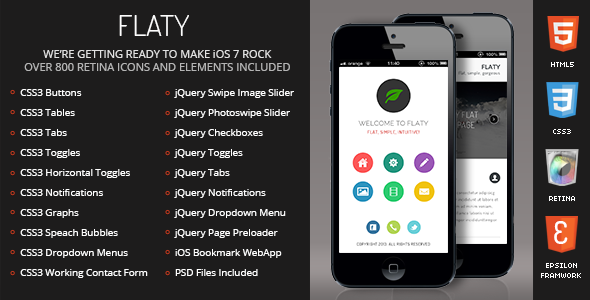
Flaty Mobile is a mobile-first HTML template sold on ThemeForest by the developer Enabled, priced at $12, that packages a flat-design interface with PhoneGap and Cordova compatibility so the same codebase can be wrapped into a native app shell. It ships with a broad set of pre-built pages, CSS3 and jQuery interface components, and an icon pack, aimed at freelancers and small agencies that need a mobile site or lightweight hybrid app delivered quickly. With 311 sales and a last vendor update in June 2019, it is a mature, low-cost starting point rather than a current-generation framework.
What Flaty Mobile Actually Delivers
The template’s core proposition is breadth over depth. Rather than a handful of screens, it bundles a large library of page types and reusable components so that most of the layout work is already done before a project starts.
Hybrid app packaging with PhoneGap and Cordova
The PhoneGap and Cordova compatibility is the feature that separates Flaty Mobile from a plain responsive website template. Cordova is an open-source tool that wraps HTML, CSS and JavaScript into installable apps for iOS, Android and other platforms. In practice this means the same markup used for a mobile website can be submitted to app stores without a separate native build. The vendor also states that iOS and Android home-screen icons and splash screens are included, which are the small but fiddly assets hybrid builds usually require.
A wide component and page library
The included pages cover the usual ground for a mobile site — contact, galleries, portfolio layouts and standard content pages — and the component list is unusually long for the price. Typography options include text, image and icon columns, drop caps, pull quotes, highlights and a CSS3-styled table. Interactive elements include toggles, accordions, tabs, large and small notification bars, and form fields with styled checkboxes and radios. Buttons come in 3D, squared, rounded and social variants. For a project that needs a lot of UI surface area covered quickly, this saves meaningful build time.
Sliders, galleries and a validated contact form
Flaty Mobile includes image sliders, a quote slider and a staff slider, plus multiple gallery and portfolio variations. A contact form with field validation is provided in CSS3, PHP and Ajax versions, so it can submit without a full page reload. The Ajax version requires a PHP-capable server, which is worth confirming before purchase if the hosting environment is static or serverless.
Touch optimisation and retina graphics
The design is built for touch devices, with navigation described as ergonomic and the graphics supplied at high-definition and retina resolution. Retina refers to screens with a high pixel density, where standard-resolution images appear soft. Eight colour schemes are included for different elements, and fonts come from Google Fonts, which keeps typography consistent across devices without bundling font files.
Device detection and preloading
Two jQuery behaviours are worth noting. Page preloading shows a loading state while assets arrive, which reduces the flash of unstyled content common on slower mobile connections. Device detection allows content or behaviour to branch based on the handset, useful when a project needs to serve slightly different experiences to older hardware.
Where Flaty Mobile Fits, and Where It Does Not
The strongest fit is a small business, event or campaign site that needs a polished mobile presence on a tight budget, particularly when the client also wants an app-store listing without paying for a native build. A freelancer quoting a fixed-price mobile site can use the included pages as a starting scaffold and spend the budget on content and customisation instead of layout. Agencies handling several small mobile projects may find the eight colour schemes useful for producing visually distinct deliverables from one codebase.
It is also a reasonable choice for internal tools — a staff directory, a simple booking flow, a product catalogue — where the priority is speed of delivery and the audience is known and limited.
Flaty Mobile is the wrong choice for a project that needs a modern JavaScript framework. There is no React, Vue or Angular integration, and no component architecture in the contemporary sense. A team building a complex, data-heavy application with state management requirements will outgrow this template quickly. It is equally unsuitable for a content-heavy site that depends on a CMS: there is no WordPress or headless CMS integration in the listing, so content updates would be manual. Finally, projects with strict accessibility or current browser-support requirements should treat the 2019 codebase as a starting point needing audit, not a finished standard.
What Setup Involves
Installation is straightforward because the product is a static HTML template rather than a plugin or theme that hooks into a platform. The download is extracted, the HTML files are opened in an editor, and content is replaced directly in the markup. No build step, package manager or command-line tooling is required, which keeps the barrier low for anyone comfortable with HTML and CSS.
Customising colours and typography means editing the stylesheets and the Google Fonts references. The eight colour schemes are a helpful shortcut here, but swapping in a brand palette still requires locating the relevant CSS variables or rules. Wiring up the contact form needs a PHP-capable host and a destination email address configured in the form handler.
Turning the template into an installable app is the most involved stage. That means installing Cordova or PhoneGap, creating a project, placing the template files in the web directory, and configuring platform-specific settings such as app icons, splash screens and signing certificates. Anyone who has not packaged a hybrid app before should budget additional time for the iOS provisioning process in particular.
A realistic estimate for a developer familiar with HTML and CSS is a few hours to get a basic site live with content swapped in, and one to two days to produce a configured, tested hybrid build. The vendor states that documentation is included and that support tickets receive responses around the clock, though the listing does not specify a support period or what happens after it ends.
Strengths and Limitations
Strengths
- Very low entry cost at $12 for a component library that would take considerably longer to build from scratch.
- Genuine PhoneGap and Cordova compatibility, including the home-screen icons and splash screens hybrid builds need.
- Unusually broad UI coverage: sliders, galleries, accordions, tabs, toggles, notifications, styled form fields and multiple button styles.
- Retina-ready graphics and Google Fonts, which reduce cross-device rendering problems.
- Written by Enabled, a ThemeForest Elite Author, which is a reasonable signal of delivery track record.
- No build tooling or framework dependency, so the learning curve is limited to HTML, CSS and a little jQuery.
Limitations
- The last vendor update was June 2019. That is a long gap, and the codebase predates current mobile browser behaviour, so testing on modern devices is essential rather than optional.
- No CMS integration. Content is edited in the markup, which does not scale for non-technical clients or frequently updated sites.
- No modern JavaScript framework support, which rules out teams standardised on React, Vue or similar.
- The Ajax contact form depends on PHP, so static hosting and serverless deployments cannot use it as shipped.
- Eight colour schemes are provided, but there is no theme customiser or settings panel — every visual change is a code edit.
- The listing does not state a support period, update policy or licensing terms beyond the standard marketplace terms.
How It Compares to the Wider Category
Mobile templates generally fall into three groups. The first is plain responsive HTML templates, which are cheaper and simpler but produce only a website. The second is hybrid-app starter kits, which include Cordova or PhoneGap wiring and app assets but often assume more developer experience. The third is full application frameworks built on React Native, Flutter or similar, which offer far more capability at a much higher cost in both money and learning time.
Flaty Mobile sits between the first two. It offers more than a static responsive template because of the hybrid packaging assets, but it does not attempt to be an application framework. Against plain responsive templates, the trade-off is a larger and older codebase in exchange for app-store readiness. Against modern frameworks, the trade-off is speed and simplicity in exchange for architectural flexibility. For a small, content-led mobile presence, the middle position is often the practical one.
Frequently Asked Questions
What is Flaty Mobile used for?
Flaty Mobile is used to build mobile websites and lightweight hybrid apps from a single HTML codebase. It provides pre-built pages, UI components and Cordova or PhoneGap compatibility so the same files can be published as a website or packaged for app stores. It suits small business sites, campaign pages and simple internal tools rather than complex applications.
Does Flaty Mobile work with WordPress?
No. Flaty Mobile is a standalone HTML, CSS and jQuery template and the listing does not include a WordPress theme or CMS integration. Content is edited directly in the markup files. A developer could port the design into a WordPress theme manually, but that is custom work and not something the product provides out of the box.
Is Flaty Mobile still maintained?
The vendor’s last recorded update was 26 June 2019, so the product has not received recent maintenance. It still functions as a static template, but the code predates several years of browser and mobile platform changes. Buyers should plan to test thoroughly on current devices and expect to patch anything that has aged poorly.
Can Flaty Mobile be published to the App Store and Google Play?
Yes, in principle. The template is compatible with PhoneGap and Cordova, the tools used to wrap web code into installable apps, and it includes iOS and Android home-screen icons and splash screens. Publishing still requires a developer account with each store, correct signing certificates, and compliance with each platform’s review guidelines.
Verdict
Flaty Mobile is worth buying for freelancers and small agencies that need a mobile site or a simple hybrid app delivered on a small budget, and who are comfortable working directly in HTML and CSS. The component library is genuinely extensive for $12, and the Cordova and PhoneGap assets remove a real chunk of hybrid packaging work. It is not the right purchase for teams needing CMS-driven content, modern framework architecture, or a codebase with recent maintenance behind it. The 2019 update date is the single biggest consideration: treat this as a solid scaffold that will need review and patching, not a finished, current product. Buyers who accept that framing will get good value; those who need ongoing vendor updates should look elsewhere.