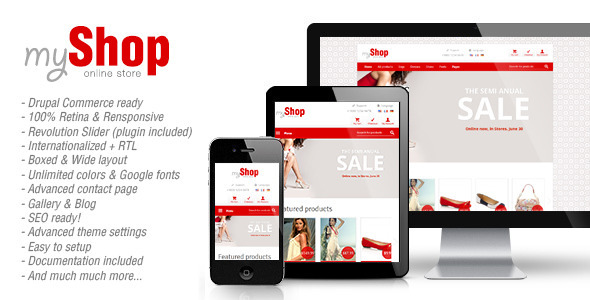
Built for Drupal 7 and wrapped around the Drupal Commerce module stack, myShop is a multipurpose storefront theme sold on ThemeForest for $58. It gives site owners a configurable shop front — product listings, cart and checkout styling, colour and typography controls — without writing template code, which makes it a sensible fit for existing Drupal 7 stores and agencies maintaining them. Among myShop Cms Themes of this vintage, the appeal is breadth of admin options rather than modern framework support.
Design Controls That Cover Layout, Colour and Type Without Code
The theme’s centre of gravity is a large options panel that exposes settings most themes bury in stylesheets. Layout can be switched between boxed and full width, which changes whether the site sits inside a fixed container or stretches across the viewport — useful for photography-led shops that want edge-to-edge imagery and corporate catalogues that prefer a tidier column.
Colour is adjustable per element rather than through a single accent picker, so header, menu, buttons, backgrounds and footer can be tuned separately. Typography draws on a library of more than 570 Google Fonts, with menu, body text and headings set independently. There are logo and background uploaders, 17 bundled background patterns, sidebar position controls, footer options for colour, overlay pattern, logo and copyright text, plus page title and breadcrumb colour settings.
For a business owner, the practical benefit is that a brand palette and type pairing can be applied in an afternoon of clicking rather than a round of developer time. Galleries support two-, three-, four- and five-column arrangements, and the theme lets a site carry as many galleries as needed — handy for lookbooks or product lifestyle shots.
Commerce and Content Tools Included in the Package
myShop is a skin over Drupal Commerce rather than a replacement for it, and that distinction matters when evaluating feature lists. Product displays, order management, line items, the payment method API, PayPal readiness, tax and VAT calculation and discount pricing all come from the Commerce module layer; the theme supplies the presentation and the page furniture around them. Buyers should expect to configure those rules inside Drupal rather than through the theme panel.
What the theme adds on top is a set of custom blocks: featured products and latest products (both touch-ready for mobile swiping), recent comments, a media block and a free-form custom block. Dropping a featured-products block into a sidebar or homepage region is a few minutes of work and needs no view-building.
Revolution Slider ships with the package — the listing values it at $15 — with 24 transition types per slide, YouTube and Vimeo embedding, drag-and-drop caption layers and support for image, video, text and background slides. Given the $58 price, the bundled slider is a real offset against buying it separately.
Multilingual support and right-to-left layout are built in, which suits stores selling into Arabic, Hebrew or Persian markets. The theme is retina-ready, uses HTML5 and CSS3, offers three levels of navigation, includes an advanced contact page and breadcrumbs, and is built on the Gumby grid framework. The listing describes the markup as SEO-ready; in practice, meaningful search optimisation on Drupal comes from modules and content structure, so treat that claim as a baseline rather than an advantage.
Where myShop Cms Themes Fit, and Where They Do Not
The strongest fit is an existing Drupal 7 site that already runs Commerce and needs a better-looking front end. A small or mid-sized catalogue — think a few dozen to a few hundred products — with straightforward tax and payment requirements is squarely in scope. Agencies supporting several legacy Drupal 7 clients can reuse the theme across projects and lean on the options panel to differentiate each build without forking templates.
It also suits projects with a modest budget where a $58 theme plus configuration time beats a custom theme quote, and stores that need RTL support without paying for an add-on. Shops selling photography, fashion or creative goods benefit most from the slider and gallery tooling.
It is the wrong choice for anyone starting a new store today on Drupal 9 or 10. The vendor’s most recent update was June 2015, and the listing names Drupal 7.22 through 7.38 as the target — this is a Drupal 7-only theme and will not run on later major versions. Projects that need a modern block editor, contemporary PHP compatibility or long-term security patching should look elsewhere. WordPress and WooCommerce users are also out of scope entirely.
What Setting the Product Up Involves
Installation assumes a working Drupal 7 site already exists, on hosting with PHP and MySQL. From there the theme file is uploaded and enabled like any Drupal theme, after which the options panel becomes available. Drupal Commerce and its dependencies need to be installed separately unless they are already present, then configured: product types, product displays, tax rates and payment rules are all Commerce-side tasks.
Counting roughly, a developer familiar with Drupal can have a themed storefront with a handful of products live in half a day. Adding tax and VAT rules, a multilingual content set and a populated slider realistically stretches to one or two days. Full documentation and video tutorials are bundled, which lowers the floor for anyone new to Drupal’s admin, though nobody should expect the theme to teach Drupal itself.
Strengths and Limitations
Strengths
- Very deep admin panel for colour, typography, layout and footer settings — most visual changes need no code.
- Revolution Slider bundled, which offsets a meaningful share of the purchase price.
- Multilingual and RTL support included rather than sold as an extra.
- Custom product blocks make homepage merchandising quick to assemble.
- Boxed and full-width layouts plus adjustable sidebars suit quite different site types.
- Documentation and video tutorials ship with the download.
Limitations
- Drupal 7 only. There is no path to Drupal 8, 9 or 10, so the theme caps the lifespan of any site built on it.
- Last vendor update was June 2015; nothing since then, meaning later PHP releases and browser quirks are unaddressed by the author.
- Commerce features are inherited from Drupal Commerce, not built by the theme, so the theme cannot fix gaps in the module layer.
- The Gumby grid framework is dated compared with contemporary grid systems, and the theme offers no modern block-based editing.
- Demo slider photographs are licensed from a stock library and are not included with the download.
- The user base is small — 182 sales — so community answers to edge-case problems are thin.
How myShop Cms Themes Compare With the Wider Market
Modern commercial Drupal themes are built for Drupal 9 and 10, target current PHP versions and usually ship with a paragraph-based or layout-builder editing experience. myShop predates all of that. Its advantage is price and completeness for a legacy stack: a single $58 purchase covers storefront styling, a premium slider, RTL support and a documented options panel, which is more than most current Drupal themes bundle at that price.
Against free Drupal contrib themes, myShop wins on out-of-the-box polish and support documentation; it loses on community size and on the fact that free themes for Drupal 7 keep receiving patches while this one does not. Against WordPress and WooCommerce themes in the same price bracket, the comparison is really about platform commitment — WooCommerce themes have far more choice and momentum, whereas myShop only makes sense if Drupal 7 is already the decided platform.
Compared with commissioning a custom Drupal 7 theme, myShop is dramatically cheaper and faster, but it constrains design to what the options panel exposes. For a store that wants a genuinely unusual layout, the panel becomes a