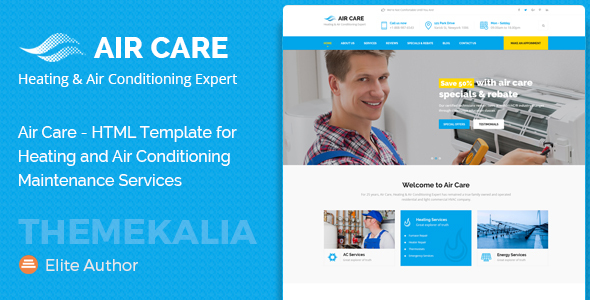
Air Care is a static HTML template from developer ThemeKalia, aimed at heating, ventilation and air conditioning contractors, appliance repair firms and other trade services that need a brochure-style website. It is not a WordPress theme: the package is a set of hand-coded HTML5 and CSS3 pages built on the Bootstrap 3 framework, sold on ThemeForest for $17. An Air Care business site built from this package suits a small HVAC company, a refrigeration or furnace contractor, or a freelancer building on a tight budget who is comfortable working directly in code rather than through an admin dashboard.
What an Air Care business site actually gets in the package
The core of the product is a page library. The vendor’s feature list puts the count at more than 20 HTML files, while other parts of the same listing say 15+ templates and 10+ additional page examples, so the exact number is best confirmed on the live preview. What is consistent is the page set: home, about, services, service detail, FAQ, testimonials, blog index, single post, gallery, shop layout and contact. For a contractor, that covers the usual buying journey without a designer having to invent a sitemap from scratch.
Two colour schemes ship with the template, a light version and a dark version. That is unusual for a niche trade template and gives a small firm a way to look distinct without commissioning custom artwork. Layouts are described as fluid and fully responsive, with retina-ready graphics, and the files are written against Bootstrap 3’s grid, so columns and spacing follow a documented system rather than ad-hoc CSS.
Slider Revolution is bundled. The vendor prices the plugin at $14, which is close to the template’s own $17 asking price, and the plugin handles animated hero slides without extra coding. For a service business, that is the section most visitors see first, so having a working slider configuration ready to populate is a practical saving.
Two features matter more than they first appear for trade work. The contact form is a working PHP AJAX form rather than a static mock-up, and the Google Map component supports multiple locations. An Air Care business often runs one office and several service areas, so a map that plots more than a single pin is a genuine convenience. Both features carry setup caveats, covered below.
Supporting pieces include blog and gallery templates, social links, footer widget areas, custom font loading through Google Fonts, a parallax option and written documentation. The vendor also states the code is commented and validated against W3 standards, and lists a support address for questions outside the documentation.
Where this template fits, and where it does not
The strongest fit is a small contractor that needs a credible five-to-eight page presence quickly and already has someone who can edit HTML. Examples include an air conditioning repair outfit adding a second service line, a furnace and water heater installer replacing an outdated site, or a handyman and appliance repair business that wants the trade-adjacent look the tag list targets. Freelancers and small agencies can also use it as a starting point for client work, since the Bootstrap grid makes restructuring predictable.
The template is a poor choice for a business that intends to publish articles weekly, change prices, or add service pages without technical help. There is no content management system, no admin panel and no database. Every text change means opening a file, editing markup and re-uploading. Any organisation whose marketing depends on frequent updates should budget for a WordPress or page-builder alternative instead.
It is also the wrong pick for anything transactional. The listing includes a shop page example, but there is no cart, no checkout and no payment integration — it is a layout, not a store. Companies needing online booking, quote calculators or product sales will have to add those systems separately.
What setup involves in practice
Prerequisites are modest but real. The buyer needs a web host that serves static files and runs PHP for the contact form to send mail, a code editor, and a plan for images. The vendor states that images are not included in the download, so photography of technicians, units and vehicles has to be sourced or licensed separately — often the largest cost in the whole project.
Installation itself is a file upload. The practical work sits in the customisation: replacing placeholder text and logos across every page, wiring the contact form to a working mailbox and testing delivery, and checking the Google Map. Because the template dates from the jQuery and Bootstrap 3 era, map implementations of that generation typically relied on APIs that now require a key and a billing account, so the map code should be verified and updated rather than assumed to work.
Slider Revolution needs configuring through its own interface, and the bundled build will be as old as the template. A front-end developer can realistically have a five-page site live in half a day to a day. Content-heavy builds with new photography, testimonials and several service pages run to two or three days. Anyone who does not write HTML should add the cost of hiring help, which changes the economics of a $17 purchase considerably.
Strengths and limitations
Strengths
- Niche-appropriate page structure already mapped out for a trade services business, including services, FAQ, testimonials and gallery.
- Slider Revolution included, which offsets much of the purchase price on its own.
- Light and dark colour variants give a small business two presentable directions without design work.
- Built on Bootstrap 3, so spacing, columns and responsive behaviour follow a well-documented grid that any front-end developer can pick up.
- Multi-location map support and a working PHP contact form cover the two functions a contractor site most needs.
- Clean, commented code and the vendor’s documentation lower the cost of handover to another developer.
Limitations
- The item was last updated in January 2018, while the changelog records only version 1.0 from May 2017. There is no documented maintenance history after that point, so the included libraries should be treated as frozen rather than current.
- Bootstrap 3 and jQuery-based scripting are of a previous generation of front-end tooling. Rebuilding on a current stack is a rewrite, not a tweak.
- No CMS: all content lives in markup files, which rules the template out for teams without technical staff.
- Images are excluded from the download, so the visible design in the preview cannot be reproduced as shown without licensed photography.
- The listing’s counts are inconsistent — 15+, 20+ and “10+ more” page templates appear in different sections — which makes the preview, not the copy, the reliable reference.
- Terms such as “unlimited sidebars” and “unlimited pages” are borrowed from WordPress theme marketing and mean little for a static template; there are no dynamic widget areas.
How it compares with the wider category
Static HTML templates occupy one end of the market. They are the cheapest and lightest option: no database, no plugin updates, fast loading and very little that can break. Against a WordPress theme in the same niche, Air Care loses on maintenance — a WordPress competitor lets a non-technical office manager publish a seasonal promotion in minutes, while Air Care requires a developer. It wins on simplicity and cost, and on the absence of plugin security surface.
Against page-builder themes built on Elementor or similar tools, the gap is visual editing. A builder lets a layout be assembled by dragging components; this template requires writing markup. The trade-off is page weight and predictability, both of which favour the hand-coded approach.
Against a custom build, the template’s advantage is the pre-designed page set — services, FAQ, testimonials and blog are already laid out for a trade audience, which a bespoke project would have to design from nothing. Its disadvantage is age: a custom build would start on current tooling and be maintained.
Frequently Asked Questions
Is Air Care a WordPress theme?
No. Air Care is a static HTML5 and CSS3 template built on Bootstrap 3, not a WordPress theme. It has no PHP template hierarchy, no database and no admin dashboard. It can be installed on any web host as plain files, and a developer could theoretically convert it into a WordPress theme, but that conversion is a separate project and not something the package includes.
Can the Air Care template be used without knowing how to code?
Only in a limited way. Text and images can be swapped by anyone who can follow instructions and edit an HTML file carefully, but changing layouts, adding pages or updating the map and form requires familiarity with HTML, CSS and a little PHP. Businesses without technical staff should plan to hire a developer for the initial build and for later changes.
Does the download include the images and a working online shop?
No on both counts. The vendor states plainly that images are not included in the ZIP, so photography has to be licensed separately. The shop page in the page set is a visual layout only — there is no cart, checkout or payment integration, and no e-commerce functionality of any kind ships with the template.
Is Slider Revolution included with the Air Care HTML template?
Yes. The vendor bundles Slider Revolution and values the plugin at $14 against a $17 template price. It is configured through its own admin interface rather than through HTML alone. Because the template has not been updated since January 2018, the bundled version will be older than the plugin’s current release, and buyers should check version compatibility before relying on it.
Verdict
Air Care is a sensible buy for a small heating, ventilation or appliance repair business that needs a well-structured brochure site at minimal cost and has a developer available to assemble it. The page set is thoughtful for the trade, the two colour schemes are a practical bonus, and the bundled slider justifies much of the price. The case against it is age: with no updates since January 2018, the stack is dated and the bundled components need verifying before launch. Buyers who need to edit content themselves or sell online should look at a CMS-based alternative instead.