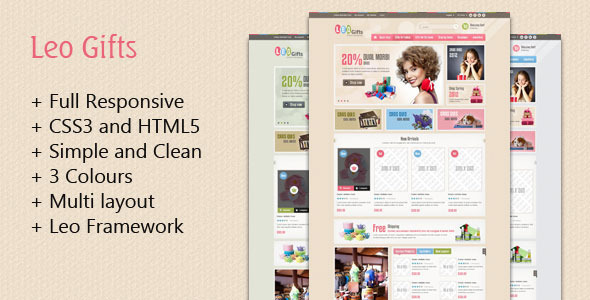
Built on the Leo Framework for PrestaShop 1.6, the Leo Gifts Prestashop Theme Ecommerce release is a responsive storefront template aimed at gift, beauty and fashion retailers. The package bundles a demo-identical quickstart install, layered PSD source files and a back-office module for switching colour schemes and page width without editing code. It fits shops already running PrestaShop 1.6 that want a finished gift-store look for a one-off $70; it does not fit anyone launching on a current PrestaShop branch.
What the Leo Gifts Prestashop Theme Ecommerce Package Actually Delivers
The feature sheet is longer than the design story, and the parts that matter cluster into three areas: visual control from the admin, a fast route to a working demo, and template overrides that reach into PrestaShop’s own modules rather than just the theme’s own files.
Colour, width and layout control from the back office
A module called Leo Theme Control Panel handles colour switching across three presets — blue, green and a default palette — plus template width. Multiple layout options are selected in the admin instead of being edited in files. A store owner can therefore reshape the storefront between campaigns without booking developer time. The trade-off is that the palettes are fixed presets, not an open colour picker, so a brand with an exact hex requirement will still need CSS work.
A quickstart package that reproduces the demo store
The download ships as an all-in-one bundle: modules, templates, a user guide and sample data. Importing it produces a site that matches the live demo, which shortens the distance between purchase and a browsable storefront. Sample content still has to be deleted and replaced, so the saving is in configuration rather than in content entry.
Module suffixes for styling without touching core files
Multiple module suffixes are built into the template. A suffix lets the same module render differently depending on where it sits — a wishlist block in the header styled unlike the same block in a sidebar — using stylesheets only. It is a small framework feature with a practical payoff: customisation stays outside the module’s own code, so future module updates are less likely to wipe it.
Template overrides for cart, wishlist, loyalty and layered navigation
The changelog names the files the theme replaces, and the list is informative: the advanced shopping cart, discount pages, loyalty views, the blockwishlist templates and the blocklayered JavaScript. Those are the components gift, beauty and cosmetics shops lean on most — saved baskets, points schemes, filtered catalogues. The theme was built around retail mechanics rather than being a generic skin with a gift-shop header image dropped on top.
Design sources, translation files and stated standards
PSD sources are included, which matters for stores that need to adapt banner graphics or promotional artwork to their own brand. Text is translatable through PrestaShop’s native language files. The listing certifies W3C XHTML 1.0 Transitional markup and valid CSS, and names IE8, Firefox 2 and Netscape among supported browsers — a compatibility list that reads as a 2017 artefact rather than a current promise.
Where the Leo Gifts Prestashop Theme Fits and Where It Does Not
The clearest fit is a small or mid-sized retailer selling physical gifts, cosmetics or fashion accessories that already has a PrestaShop 1.6 installation and wants a competent storefront quickly. The second fit is an agency or freelancer maintaining a 1.6 client site that needs a refresh without a platform migration. The third is a budget-constrained launch where $70 for a theme plus demo data is realistic and a custom build is not.
The wrong choice is any new project on PrestaShop 1.7 or 8.x. The theme targets 1.6 exclusively, and a merchant who installs a current PrestaShop release cannot use it at all. It is also a poor fit for stores that depend on a vendor actively patching templates in step with platform security releases, or that need modern checkout, accessibility and performance work baked in rather than added later. With 239 recorded sales, the theme has a modest but visible install base rather than a large one.
Frequently Asked Questions
Is the Leo Gifts Prestashop Theme compatible with PrestaShop 1.7 or 8.x?
No. The theme is built for PrestaShop 1.6 and is not intended for 1.7 or 8.x stores. A merchant running a current PrestaShop release should choose a theme built for that branch rather than trying to force a 1.6 template onto it.
What is included in the Leo Gifts Prestashop Theme Ecommerce package?
The download includes the theme, required modules, template overrides, a quickstart install with sample data, layered PSD source files and a user guide. The quickstart is intended to reproduce the demo store so that configuration can begin from a working layout rather than a blank install.
Can I change the storefront colours and width without editing code?
Yes, within limits. The Leo Theme Control Panel provides three colour presets and template width settings that can be switched from the back office. The presets are fixed rather than an open colour picker, so stores with an exact brand hex requirement will still need CSS adjustments.
Is this theme a good fit for gift, beauty and fashion retailers?
It is aimed at those categories. The template overrides cover the shopping cart, wishlist, loyalty and layered navigation components that gift, beauty and cosmetics shops commonly use. It suits a small or mid-sized PrestaShop 1.6 store that wants a finished retail look quickly, but it is not a replacement for a current platform migration or a custom accessibility and performance build.