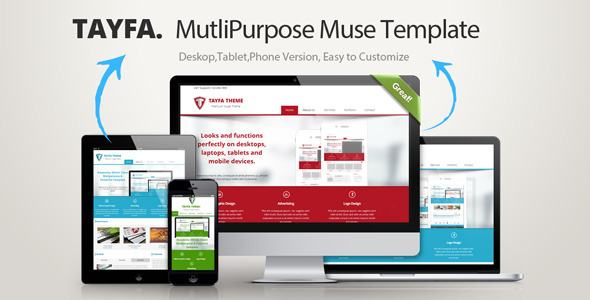
Tayfa Multipurpose Muse Template is a corporate-oriented website template built for Adobe Muse, the discontinued drag-and-drop design tool from Adobe. It ships with desktop, tablet and mobile layouts, three colour variations, portfolio widgets, a lightbox, a contact form and bundled graphics, and it sells on ThemeForest for $21. It suits agencies and freelancers who still maintain legacy Muse projects or need to rebuild an existing Tayfa-based site, not newcomers starting a fresh build in 2024 and beyond.
What the Tayfa Multipurpose Muse Template actually delivers
The core of the package is a set of three responsive layouts — desktop, tablet and mobile — that the vendor added over two releases, with the tablet and mobile versions arriving in the v1.1 update in January 2014. That timeline matters, because it tells a buyer what they are getting: a template designed for the responsive breakpoints Muse supported at that moment, not a modern fluid-grid system.
The design layer is built around three colour variations, described in the listing as blue and red among others. Switching between them is a matter of picking a different page or swatch set rather than editing global styles token by token, which is how Muse templates typically handled theming. For a corporate Muse Template project, that means a brand-colour change is a fast operation rather than a rebuild.
Layout editing happens inside Muse itself through drag and drop. Pages are assembled from placed rectangles, text frames and widgets, so repositioning a headline or resizing a hero block requires no code. The vendor also bundles an HTML export alongside the Muse file, which is useful if the client’s host does not accept Muse’s own publishing route or if the site needs to be handed to a developer later.
Portfolio widgets and a lightbox are included, so image-heavy case study pages can be assembled without writing a gallery script. A contact form is provided as a standard Muse widget, which means it will need a third-party form handler or Muse’s own form processing to actually deliver mail — the listing does not state which. Typkit Webfonts support is built in, so typefaces load from Adobe’s font service rather than local files.
All graphics and icons ship inside the download, with one stated exception: the people photographs shown in the preview are not included. That is the single most common source of disappointment with template purchases, and the vendor is at least explicit about it here.
Where this template fits, and where it does not
The strongest fit is a business that already has a Tayfa-based site, or an agency holding a Muse subscription and a client who wants a fast, conventional corporate presence: an about page, a services grid, a team section, a portfolio and a contact form. Small professional firms — consultancies, studios, legal or accounting practices — map cleanly onto this structure. Freelancers rebuilding an existing Muse project after a host migration are the other obvious audience, since the file is editable and the layout is already proven.
It is the wrong choice for anyone starting a new site without Muse. Adobe discontinued Muse in 2018 and stopped activating it, so a buyer who does not already have a working installation faces a prerequisite problem before they open a single file. It is also wrong for a project that needs e-commerce, membership, multilingual routing, a blog with structured archives, or anything requiring a plugin ecosystem. Muse templates are static design files with limited widget logic — they are not a CMS, and the Tayfa listing claims no CMS integration.
Finally, it is a poor fit for a client with strict accessibility or Core Web Vitals requirements. Muse’s generated markup is famously heavy on absolutely positioned elements, which limits how well a page reflows for screen readers and how efficiently it renders on slow connections. That is a property of the tool, not of this template, but it belongs in the buying decision.
What setup involves, and how long it takes
The prerequisite list is short but unforgiving. A buyer needs a licensed, installed copy of Adobe Muse on a machine that still runs it, plus the template archive from ThemeForest. Muse relied on Adobe’s servers for publishing and for Typekit fonts, and those services have changed since 2014, so a working local preview may require workarounds. Anyone without an existing Muse installation should test that assumption before spending the $21.
With Muse running, the process is conventional. Unzip the archive, open the .muse file, and the pages appear in the plan view. Colour variation, logo replacement and copy editing are straightforward. Swapping the preview photography takes longer, because the people images are excluded and must be sourced and licensed separately — that is realistically an hour or two of stock selection for a five-page site.
Form handling is the step that most often stalls. Muse’s contact widget needs a mail handler configured, and the vendor does not specify one, so plan on wiring a third-party service. Publishing or exporting to HTML adds another pass, particularly if the site is going onto a host that does not support Adobe’s publishing pipeline. A realistic estimate for a competent Muse user is three to six hours to a launchable five-page corporate site, and considerably longer for anyone learning Muse from scratch.
Strengths and limitations in plain terms
Strengths
- Three separate responsive layouts — desktop, tablet and mobile — rather than one layout squeezed into breakpoints.
- Three colour variations make brand recolouring fast without touching layout.
- Portfolio widgets and a lightbox are included, removing the need to build a gallery from scratch.
- An HTML export ships alongside the Muse file, which helps with hosting flexibility and handover.
- Graphics and icons are bundled, so the visual language stays consistent without extra asset purchases.
- 240 sales and a ThemeForest listing give it a modest but real track record.
- At $21, the financial risk is low relative to a custom design build.
Limitations
- Adobe Muse is discontinued, so the template depends on a tool the buyer may not be able to install or activate.
- The last vendor update was January 2014; nothing in the listing indicates maintenance since then.
- The people photographs in the preview are not included, which materially changes the look of a finished page.
- The vendor does not state which form handler the contact widget uses, leaving that integration undocumented.
- No CMS, e-commerce or blog architecture is claimed, so content updates are manual design edits.
- Muse’s absolutely positioned output limits accessibility and performance tuning.
How it compares with the wider corporate template category
Modern corporate templates on the same marketplace are usually built for WordPress, Elementor, Webflow or another live platform, and they come with a CMS, a block or component library, and update histories that run to the present year. Their cost is typically higher than $21, but the ongoing maintenance path exists. Tayfa competes on price and on the specific convenience of a drag-and-drop Muse workflow, not on capability breadth.
Against HTML-only corporate templates, Tayfa’s advantage is that a non-coder can restructure a page visually, while a hand-coded template demands comfort with markup. The trade-off is that the hand-coded option produces lighter, more portable output and is not tied to a dead application.
Against page builders inside a CMS, the comparison is lopsided. A CMS-based corporate template handles content editing, SEO fields, plugin integrations and hosting migration without a designer. Tayfa cannot do any of that; it produces a fixed set of pages. Where it wins is speed to a finished visual for someone already fluent in Muse, and a look that is deliberately simple rather than assembled from a bloated component library.
Data on the developer, onecome, is limited to this listing and its sibling releases. There is no public roadmap or support forum referenced, so buyers should treat support as email-only and informal.
Frequently Asked Questions
Does the Tayfa Multipurpose Muse Template work without Adobe Muse?
No. The editable source is a Muse file, and design changes require Adobe Muse installed and running. The package does include an HTML export, so a finished site can be hosted without Muse, but that export is a static output — editing it means working directly in HTML and CSS rather than through a visual editor.
Is this template still updated and supported?
The vendor’s last recorded update was 9 January 2014, which added the tablet and mobile layouts. Nothing in the listing suggests maintenance since then. Support appears to be limited to contacting the developer by email, and no documentation, changelog or community forum is referenced, so buyers should assume no active development.
Are the images in the preview included in the download?
Only partly. The listing states that all graphics and icons are inside the download file except the people images, which are stock photography and must be licensed separately. Anyone planning to reproduce the preview closely should budget for stock photos and expect the finished site to look different until those are sourced.
Can the Tayfa corporate template be used for an online store or blog?
Not without substantial custom work. There is no e-commerce, membership or blog architecture in the package, and Muse templates do not connect to a CMS by default. The template is a set of static corporate pages — services, portfolio, contact — so a store or regularly updated blog would require a different platform entirely.
Verdict: who should buy it and who should not
Buy the Tayfa Multipurpose Muse Template if a working Muse installation is already on the machine, the project is a straightforward corporate brochure site, and $21 against a few hours of layout work is an easy trade. It also makes sense for restoring or extending an existing Tayfa-based site where the visual language is already established. Buyers should go in expecting to source their own photography and to configure form delivery themselves.
Everyone else should look elsewhere. Without Muse, the file is unopenable as a design source, and no amount of HTML export compensates for a dead authoring tool. Projects needing a CMS, a store, ongoing updates or modern accessibility standards belong on a maintained platform, where the higher licence cost buys a maintenance path this template cannot offer.