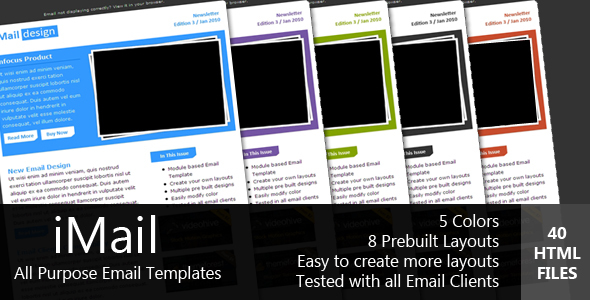
Eight prebuilt HTML newsletter designs, five colour schemes and a library of reusable content blocks make up iMAIL Email Templates, an $8 ThemeForest pack aimed at small businesses, freelancers and agencies that want a corporate-looking email without building one from scratch. The product works on a module system, where each layout is assembled from blocks that can be copied, pasted and rearranged into fresh arrangements. Buyers also receive PSD source files, a step-by-step tutorial and written documentation. It has sold 201 times on the marketplace and was last updated by its author, anique, in July 2010 — a date that shapes nearly every judgement below.
What the iMAIL Email Templates Package Actually Contains
The centrepiece is a set of eight complete layouts. The vendor’s own tags lean toward corporate, clean and modern styling, with newsletter, photography and web listed alongside blue, green and orange palettes. In practice that points to straightforward business communication — announcements, company updates, product notes — rather than heavy promotional retail design. Each layout is a finished HTML file, not a starting sketch.
Underneath the layouts sits a module system of more than a dozen reusable blocks. A block is a self-contained chunk of HTML — a header area, a text section, an image band — that can be lifted from one layout and dropped into another. The vendor describes assembling a new layout in seconds. That claim holds only as far as the buyer’s comfort with HTML goes; someone who can read table markup will move quickly, while someone hoping for a visual editor will not.
Five colour schemes ship with the pack. Blue, green and orange appear in the tag list, and a 2010 revision specifically added further colour options, so the palette range is broader than the original release. The schemes are style variations rather than a theming system: changing brand colours means editing CSS or inline values, which is where the PSD resources earn their place. Those layered source files let a designer rebuild or recolour graphics to match a client’s identity instead of accepting the vendor’s defaults.
Documentation and a quick-start tutorial cover creating, editing and modifying both modules and layouts. The vendor also states compatibility with all major email clients, and a December 2010 revision was issued to correct validation errors — a small but telling detail, since malformed markup is one of the most common reasons a template breaks in Outlook.
Where These Email Templates Fit and Where They Do Not
The strongest fit is a one-off corporate send. A small firm that needs a tidy company update, a seasonal greeting or an internal announcement can take one layout, swap the logo and copy, and have something presentable the same afternoon. Freelancers quoting on a low-budget project benefit too: $8 buys a legitimate design foundation, and the PSD files mean the result need not look like a stock template.
Agencies can use iMAIL Email Templates as a base layer for junior staff — the module approach encourages consistent structure, and the documentation gives a newcomer something to follow. Photography-led businesses are another reasonable match, given the image-oriented blocks and the tag listing. Newsletter publishers running a simple, text-heavy digest will also find the layouts serviceable.
The wrong choice is a modern marketing programme. Anything that depends on mobile rendering, dark-mode support, accessibility compliance or tight integration with a sending platform is a poor match for a pack last revised in 2010. High-volume senders who A/B test and monitor rendering across a dozen clients should not start here either; the vendor’s compatibility claim predates the current email client landscape and cannot be treated as verified today.
What Setup Involves in Practice
The prerequisites are modest but real: an HTML editor, a place to host images, and access to whatever platform will send the email — an email service provider, a CRM or a plain mail client. Buyers who intend to modify artwork also need an image editor that opens PSD files. No build tools, framework installs or dependencies are involved.
The workflow is to open a layout, replace placeholder images and text, adjust colours, then paste module blocks in or out until the structure matches the brief. Testing follows: the file should be sent to several real inboxes before a campaign goes out, because previewing in a browser tells almost nothing about how an email will render. A first layout typically takes an hour or two for someone comfortable with markup, and considerably longer for a buyer learning HTML mail structure as they go. Reusing the same modules for later sends cuts that to minutes.
Strengths and Limitations of iMAIL Email Templates
Strengths
- Very low entry cost. At $8 the pack pays for itself if it saves a single afternoon of layout work.
- Genuinely reusable modules. The copy-and-paste block system produces new layouts quickly and keeps structure consistent across a series of sends.
- Layered PSD files included. Most budget email packs ship HTML only; the source artwork makes rebranding realistic rather than theoretical.
- Written documentation plus a tutorial. Both are supplied, which matters for buyers new to email HTML.
- Eight layouts and five colour schemes give enough variety for occasional senders without decision paralysis.
Limitations and trade-offs
- The product has not been updated since July 2010. Layout techniques from that period rely on fixed-width tables; the vendor does not state any responsive or fluid behaviour, so layouts will not reflow on phone screens.
- No stated dark-mode handling, accessibility guidance or plain-text versions. Those are baseline expectations in current email work and each one becomes the buyer’s problem to solve.
- The compatibility claim is unverified for today’s clients. “All major clients” was written when the inbox landscape looked very different, and the vendor publishes no current testing matrix.
- It is not a visual builder and does not plug into a sending platform. Editing happens in HTML, and merge tags for subscriber data must be added manually.
- Fixed design choices. Eight layouts and five palettes is a small library for a brand with a strict style guide.
How It Compares With the Wider Email Template Category
Modern template packs compete mainly on three fronts: responsive layouts, tested rendering across current clients, and some degree of integration with email service providers. On the first two, iMAIL Email Templates is outmatched by newer alternatives by default, because the vendor has not revised it in over a decade. Buyers who need a template that folds neatly into a platform’s drag-and-drop editor or inherits brand colours from a settings panel will find better matches elsewhere.
What the pack still competes on is price and simplicity. Free HTML email frameworks exist and are better maintained, but they demand more assembly and often assume stronger technical skills. Custom design costs multiples of $8. Sitting between the two, this pack suits a buyer who wants finished markup to hand-edit rather than a system to configure — and who accepts the manual testing burden that comes with older code. The trade-off is consistent: less capability, far less cost, no ongoing maintenance.
Frequently Asked Questions
Is iMAIL Email Templates mobile responsive?
No. The vendor does not state responsive or fluid behaviour anywhere in the listing, and the last revision was in 2010, before media queries became